Best Free Cybersecurity Tools for Small Businesses in 2026
Your small business has a limited budget, no dedicated IT department, and a growing list of digital threats aimed directly at companies your size. You know you need better security. You just can't afford the $5,000–$15,000/year enterprise security stack that consultants keep pitching you. Here's the good news: in 2026, the free cybersecurity tooling available to small businesses is genuinely powerful. Not "free trial" powerful. Not "crippled demo" powerful. Actually functional, production-grade tools that address the most common attack vectors targeting small companies. This guide covers seven specific free tools organized by the security problem they solve. Each one is free for small business use, deployable without a full-time IT team, and effective against real-world threats. No filler. No paid tools disguised as free recommendations. 1. Microsoft Defender — Endpoint Protection (Already on Your Computers) The problem it solves: Malware, ransomware, and spyware infecting your workstations. Most small businesses running Windows 11 already have Microsoft Defender installed. It's built into the operating system, updates automatically through Windows Update, and requires zero configuration to provide baseline protection. What the free version actually does: How to maximize it for your business:Enable Controlled Folder Access in Windows Security settings to protect your most critical business directories (financial records, client databases, contracts) from ransomware encryption. Turn on cloud-delivered protection and automatic sample submission. Ensure all workstations are running Windows 11 with the latest feature updates — Defender's capabilities have expanded significantly in recent versions. Honest limitation: Defender is strong for known threats and increasingly …
Your small business has a limited budget, no dedicated IT department, and a growing list of digital threats aimed directly at companies your size. You know you need better security. You just can’t afford the $5,000–$15,000/year enterprise security stack that consultants keep pitching you.
Here’s the good news: in 2026, the free cybersecurity tooling available to small businesses is genuinely powerful. Not “free trial” powerful. Not “crippled demo” powerful. Actually functional, production-grade tools that address the most common attack vectors targeting small companies.
This guide covers seven specific free tools organized by the security problem they solve. Each one is free for small business use, deployable without a full-time IT team, and effective against real-world threats. No filler. No paid tools disguised as free recommendations.
1. Microsoft Defender — Endpoint Protection (Already on Your Computers)
The problem it solves: Malware, ransomware, and spyware infecting your workstations.
Most small businesses running Windows 11 already have Microsoft Defender installed. It’s built into the operating system, updates automatically through Windows Update, and requires zero configuration to provide baseline protection.
What the free version actually does:
Real-time malware scanning and blocking
Ransomware protection with Controlled Folder Access (prevents unauthorized apps from modifying files in protected directories)
Cloud-delivered protection that checks suspicious files against Microsoft’s threat intelligence in real time
Firewall management for inbound and outbound connections
SmartScreen filtering that blocks malicious websites and downloads in Microsoft Edge
How to maximize it for your business: Enable Controlled Folder Access in Windows Security settings to protect your most critical business directories (financial records, client databases, contracts) from ransomware encryption. Turn on cloud-delivered protection and automatic sample submission. Ensure all workstations are running Windows 11 with the latest feature updates — Defender’s capabilities have expanded significantly in recent versions.
Honest limitation: Defender is strong for known threats and increasingly capable against emerging ones, but it lacks the centralized management dashboard that paid endpoint detection and response (EDR) platforms provide. If you have 10+ employees, monitoring Defender alerts across all machines individually becomes impractical. At that point, consider Microsoft Defender for Business (included in Microsoft 365 Business Premium at ~$22/user/month) for centralized visibility.
Best for: Solo operators and micro-businesses with 1–10 Windows workstations.
2. Cloudflare Zero Trust (Free Tier) — Network Security & DNS Filtering
The problem it solves: Employees accessing malicious websites, phishing links, and unsafe content from any location.
Cloudflare Zero Trust’s free plan covers up to 50 users — which makes it one of the most generous free security offerings available to small businesses in 2026. It replaces the traditional perimeter firewall model with cloud-based security that follows your employees wherever they work.
What the free version actually does:
DNS filtering: Blocks access to known malicious domains, phishing sites, and malware distribution networks at the DNS level. When an employee clicks a phishing link, Cloudflare intercepts the request before the page loads.
Browser isolation (limited): Renders suspicious web pages in a remote cloud browser, preventing malicious code from reaching the employee’s device.
Application access controls: Restricts which cloud applications your team can access based on identity, device posture, and location.
DLP (Data Loss Prevention) basics: Monitors outbound traffic for sensitive data patterns like credit card numbers or Social Security numbers.
How to deploy it: Sign up at Cloudflare’s Zero Trust dashboard (free for up to 50 users). Install the Cloudflare WARP client on each employee’s device. Configure your DNS filtering policies to block known threat categories (malware, phishing, command-and-control servers). The entire setup takes roughly 30–60 minutes for a team of 10.
Honest limitation: The free tier limits you to 50 users and doesn’t include advanced features like full browser isolation, CASB (Cloud Access Security Broker) integration, or detailed logging beyond 24 hours. If your team exceeds 50 people or you need compliance-grade audit logs, you’ll need the paid Teams plan at ~$3/user/month.
Best for: Small teams of 2–50 employees who need network-level threat blocking without buying hardware firewalls.
3. Bitwarden (Free Tier) — Password Management
The problem it solves: Employees reusing passwords, sharing credentials via email or sticky notes, and storing login information in unsecured spreadsheets.
Password reuse is the single most exploited vulnerability in small businesses. When one employee’s reused password appears in a data breach, attackers use credential stuffing to access your company’s email, CRM, accounting software, and cloud storage.
What the free version actually does:
Generates and stores unique, strong passwords for every account
Autofills credentials in browsers and mobile apps
Syncs across all devices (desktop, mobile, browser extensions)
Encrypts all data end-to-end with AES-256 encryption — Bitwarden’s servers cannot read your passwords
Offers a free Organizations plan for up to 2 users with shared vault access
How to deploy it for your team: Start by having every employee create a free Bitwarden account and import their existing passwords from their browser’s built-in password manager. Enable MFA on each Bitwarden vault (using an authenticator app, not SMS). Once everyone is using unique passwords, the credential stuffing risk drops to near zero.
For teams larger than 2, Bitwarden’s paid Teams plan costs $4/user/month and adds shared collections, emergency access, and admin controls. At that price point, it’s one of the highest-value security investments a small business can make.
Honest limitation: The free Organizations tier is limited to 2 users. Teams of 3+ need the paid plan for shared vault functionality. Individual free accounts work fine for personal password management but don’t provide the centralized sharing and admin oversight that businesses need.
Best for: Every small business, regardless of size. Start free, upgrade to Teams when you need shared vaults.
4. Have I Been Pwned + Firefox Monitor — Breach Monitoring
The problem it solves: Not knowing when your business email addresses or employee credentials have been exposed in a data breach.
Data breaches happen constantly. In 2026, billions of records are exposed annually across thousands of incidents. If your company’s email domain appears in a breach and you don’t know about it, attackers are already trying those credentials against your systems.
What these tools do:
Have I Been Pwned (HIBP): Enter your email address or domain at haveibeenpwned.com to check whether your credentials have appeared in any known data breaches. The service is free for individual lookups and offers a Domain Search feature that lets you check all email addresses under your business domain.
Firefox Monitor: Mozilla’s free service (monitor.firefox.com) builds on HIBP’s database and adds ongoing monitoring. Enter your email, and Firefox Monitor alerts you whenever your credentials appear in a new breach. It also provides specific guidance on what to do for each breach type.
How to deploy it: Run a Domain Search on HIBP for your business email domain. This immediately reveals which employee accounts have been compromised. For any exposed accounts, force password resets and enable MFA immediately. Then enroll your key business email addresses in Firefox Monitor for ongoing alerts.
Honest limitation: These tools only detect breaches that have been publicly discovered and cataloged. If a breach hasn’t been reported or the stolen data hasn’t surfaced in known databases, HIBP won’t flag it. They’re a reactive monitoring layer, not a preventive one.
Best for: Every small business with a company email domain. This is a 10-minute setup that provides ongoing visibility into your credential exposure.
5. ProtonMail (Free Tier) — Encrypted Email Communication
The problem it solves: Sensitive business communications (client data, financial details, legal documents) being intercepted or accessed through compromised email accounts.
Standard email (Gmail, Outlook, Yahoo) is not end-to-end encrypted by default. Your emails exist in readable form on the provider’s servers, which means they can be accessed through account compromise, legal requests, or server breaches.
What the free version actually does:
End-to-end encryption for emails sent between ProtonMail users
Password-protected emails for sending encrypted messages to non-ProtonMail recipients (the recipient receives a link and enters a shared password to decrypt)
Zero-access encryption on stored emails — ProtonMail’s servers cannot read your messages
Based in Switzerland, subject to Swiss privacy laws rather than U.S. surveillance frameworks
When a small business should use it: You don’t need to migrate your entire company to ProtonMail. Use it for specific high-sensitivity communications: sending client financial data, sharing legal documents, transmitting login credentials to new employees, or communicating with clients in regulated industries (healthcare, finance, legal).
Honest limitation: The free tier provides 500 MB of storage (expanding to 1 GB over time) and limits you to 150 messages per day with one email address and three folders. It’s sufficient for occasional sensitive communications but not for replacing your primary business email. For full business email replacement, ProtonMail’s paid plans start at ~$4/user/month.
Best for: Small businesses that occasionally send sensitive client data and need a secure channel without purchasing an enterprise email encryption gateway.
The problem it solves: Losing business data to ransomware, hardware failure, or accidental deletion with no way to recover.
We covered the 3-2-1 backup rule in our Cybersecurity for Beginners guide. Duplicati is the free tool that makes implementing that rule practical for small businesses without IT staff.
What it does:
Creates encrypted, compressed backups of your selected files and folders
Supports backup destinations including local drives, NAS devices, and cloud storage (Google Drive, OneDrive, Dropbox, Amazon S3, Backblaze B2, and 20+ other providers)
Runs on a configurable schedule (hourly, daily, weekly) with automatic retention policies
Uses AES-256 encryption so your backups are unreadable even if the storage destination is compromised
Performs incremental backups after the initial full backup, meaning subsequent backups are fast and storage-efficient
How to deploy it: Install Duplicati on your primary business workstation or file server. Select the folders containing your critical business data (client records, financial documents, project files). Choose a cloud destination (Backblaze B2 is the most cost-effective at ~$6/TB/month for the storage itself). Set a daily backup schedule. The initial backup may take several hours depending on data volume; subsequent daily backups typically complete in minutes.
Honest limitation: Duplicati is open-source and community-supported, which means there’s no dedicated customer support team to call if something breaks. The interface is functional but not polished. Restoring large datasets can be slow. If you need enterprise-grade backup with guaranteed SLAs and support, consider Veeam Agent Free (for single workstations) or a paid cloud backup service like Backblaze Business Backup.
Best for: Small businesses that need reliable, encrypted, automated backups without paying for enterprise backup software.
7. CISA Cyber Hygiene Services — Vulnerability Scanning (Free for U.S. Organizations)
The problem it solves: Not knowing which security vulnerabilities exist on your public-facing systems (website, email server, remote access portals).
The Cybersecurity and Infrastructure Security Agency (CISA) offers free vulnerability scanning to U.S.-based organizations, including small businesses. This is a government-funded service that most small business owners don’t know exists.
What it does:
Vulnerability scanning: CISA scans your public-facing IP addresses and domains weekly for known vulnerabilities (outdated software, misconfigured servers, exposed databases, open ports). You receive a detailed report identifying each vulnerability with severity ratings and remediation guidance.
Phishing campaign assessment: CISA can send simulated phishing emails to your employees and provide a report on click rates, helping you identify training gaps.
Remote penetration testing: For qualifying organizations, CISA offers limited remote penetration testing to identify exploitable weaknesses.
How to request it: Visit cisa.gov/cyber-hygiene-services and submit a request form. You’ll need to verify domain ownership and authorize CISA to scan your infrastructure. The process takes 1–2 weeks from request to first scan report.
Honest limitation: CISA’s services are limited to U.S.-based organizations and focus on public-facing infrastructure. They don’t scan internal networks or individual workstations. The scanning is weekly, not continuous. And demand for these services is high, so onboarding can take longer than advertised during peak periods.
Best for: U.S.-based small businesses with a public website, customer portal, or remote access system who want professional-grade vulnerability assessment at zero cost.
How These 7 Tools Work Together?
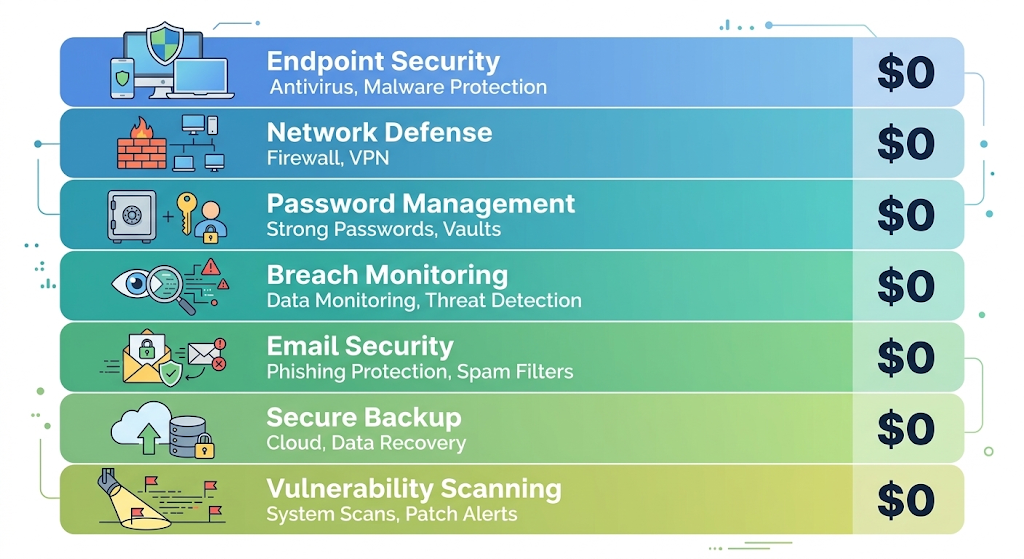
Here’s what a complete free security stack looks like for a small business:
Security Layer
Tool
Cost
Endpoint protection
Microsoft Defender
$0 (built-in)
Network filtering
Cloudflare Zero Trust
$0 (up to 50 users)
Password management
Bitwarden
$0 (individual) / $4/user (teams)
Breach monitoring
Have I Been Pwned + Firefox Monitor
$0
Encrypted email
ProtonMail
$0 (limited)
Data backup
Duplicati
$0 (+ cloud storage cost)
Vulnerability scanning
CISA Cyber Hygiene
$0 (U.S. only)
Total monthly cost: $0–$50 depending on team size and cloud storage needs. Compare that to the $500–$1,500/month that managed security service providers (MSSPs) typically charge small businesses for comparable coverage.
This stack won’t make you invincible. No security setup will. But it addresses the attack vectors responsible for the vast majority of small business breaches: credential theft, phishing, malware, ransomware, and unpatched vulnerabilities.
Frequently Asked Questions
Can I really secure my small business for free?
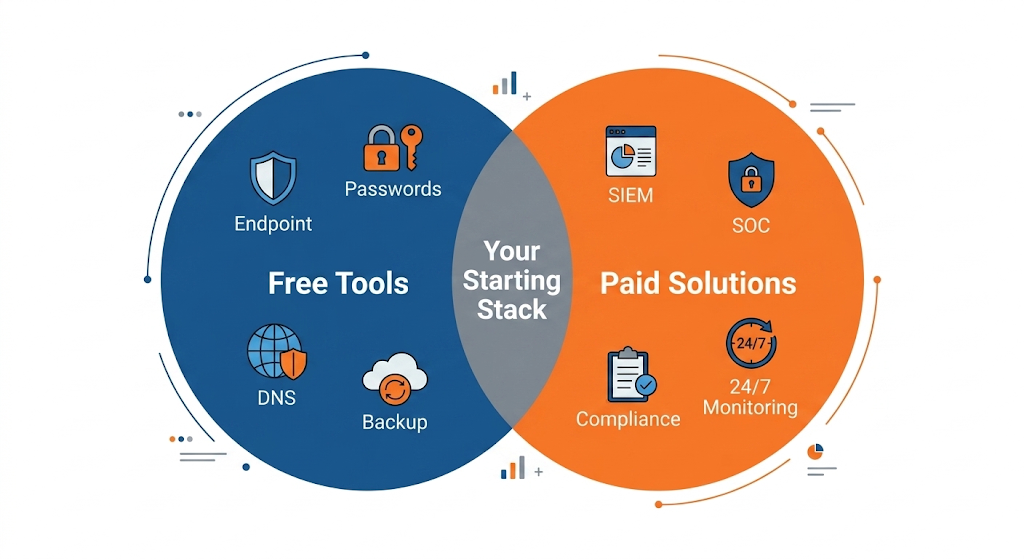
You can build a strong foundation with free tools, but “free” has limits. The tools in this guide cover endpoint protection, network filtering, password management, breach monitoring, encrypted communication, backups, and vulnerability scanning. What they don’t cover is centralized management, 24/7 monitoring, incident response, and compliance auditing. As your business grows beyond 20–30 employees, you’ll likely need to invest in paid solutions or a managed security provider for those capabilities.
Which free tool should I deploy first?
Start with Bitwarden for password management and Microsoft Defender for endpoint protection. Credential theft and malware are the two most common attack vectors against small businesses, and these two tools address both with minimal setup time. Add Cloudflare Zero Trust and breach monitoring in your second week.
Do these free tools meet compliance requirements (HIPAA, PCI, SOC 2)?
Partially. Many compliance frameworks require specific controls (encryption, access management, audit logging, incident response) that these tools can help satisfy. However, compliance is about documented processes and verified controls, not just installed software. If you operate in a regulated industry, use these tools as your technical foundation but consult a compliance specialist to ensure your overall program meets the specific requirements of your framework.
Are open-source tools like Duplicati safe for business use?
Yes. Open-source security tools are widely used in enterprise environments and are often more transparent than proprietary alternatives because their code is publicly auditable. Duplicati, Bitwarden, and Wazuh are all open-source and trusted by thousands of organizations. The trade-off is the lack of dedicated commercial support — if something breaks, you’ll rely on community forums rather than a help desk.
How often should I review my security tool setup?
Quarterly. Set a recurring calendar reminder to verify that all tools are running, updates are current, backup tests are successful, and breach monitoring alerts are being reviewed. Security tools that aren’t maintained become security liabilities.