Best Gaming Gadgets in 2026: The Ultimate Buyer’s Guide for Every Budget
You just spent $1,200 on a gaming PC with a GPU that can push 200 frames per second. Then you plugged in a $15 membrane keyboard from 2019, a mouse with a dying sensor, and a headset that makes your ears sweat after 30 minutes. Your rig is a sports car. Your peripherals are bicycle tires. The truth most gaming guides won't tell you: your gadgets — the things your hands actually touch and your ears actually hear — affect your gaming experience more than the difference between a mid-range and high-end GPU. A 144Hz monitor with a 1ms response time will improve your competitive performance more than upgrading from an RTX 4070 to an RTX 4080. A comfortable mouse that fits your hand will improve your aim more than any sensitivity tweak in your game settings. This guide covers the entire gaming gadget landscape in 2026 — headsets, keyboards, mice, controllers, monitors, and accessories — organized by budget so you can find the best gear for what you can actually afford. No $500 recommendations disguised as "essential." No affiliate-padded filler. Just honest picks across three price tiers. How to Use This Guide? This article is a hub. Each section gives you the key buying criteria and top recommendations for a gadget category at three budget levels. If you want a deeper dive into a specific category, we've linked to our dedicated articles throughout. The three budget tiers: Gaming Headsets: What to Look For in 2026 Your headset is the …
You just spent $1,200 on a gaming PC with a GPU that can push 200 frames per second. Then you plugged in a $15 membrane keyboard from 2019, a mouse with a dying sensor, and a headset that makes your ears sweat after 30 minutes.
Your rig is a sports car. Your peripherals are bicycle tires.
The truth most gaming guides won’t tell you: your gadgets — the things your hands actually touch and your ears actually hear — affect your gaming experience more than the difference between a mid-range and high-end GPU. A 144Hz monitor with a 1ms response time will improve your competitive performance more than upgrading from an RTX 4070 to an RTX 4080. A comfortable mouse that fits your hand will improve your aim more than any sensitivity tweak in your game settings.
This guide covers the entire gaming gadget landscape in 2026 — headsets, keyboards, mice, controllers, monitors, and accessories — organized by budget so you can find the best gear for what you can actually afford. No $500 recommendations disguised as “essential.” No affiliate-padded filler. Just honest picks across three price tiers.
How to Use This Guide?
This article is a hub. Each section gives you the key buying criteria and top recommendations for a gadget category at three budget levels. If you want a deeper dive into a specific category, we’ve linked to our dedicated articles throughout.
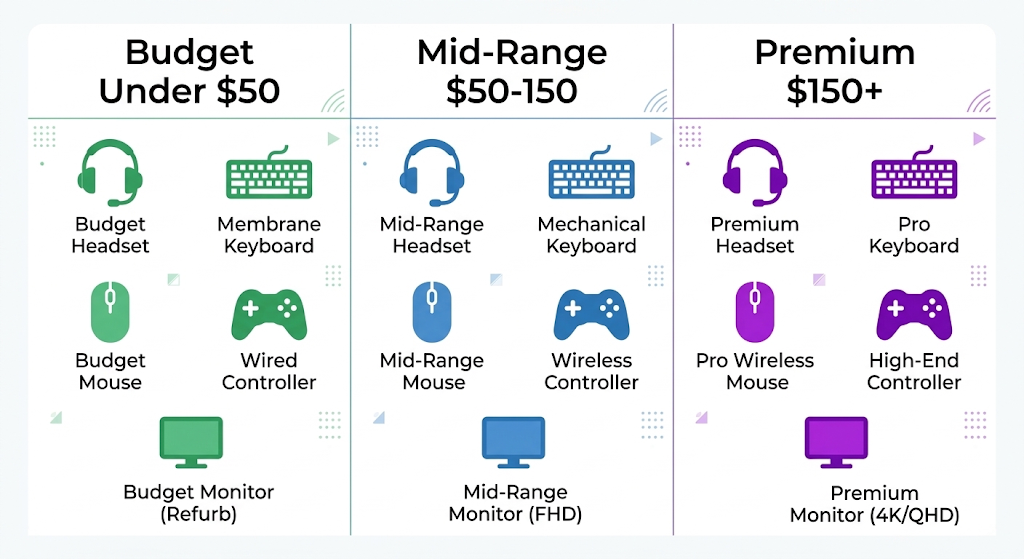
The three budget tiers:
Budget (Under $50): Best value for casual gamers and beginners
Mid-Range ($50–$150): The sweet spot for most gamers — where diminishing returns haven’t kicked in yet
Premium ($150+): For competitive players, enthusiasts, and streamers who need every advantage
Gaming Headsets: What to Look For in 2026
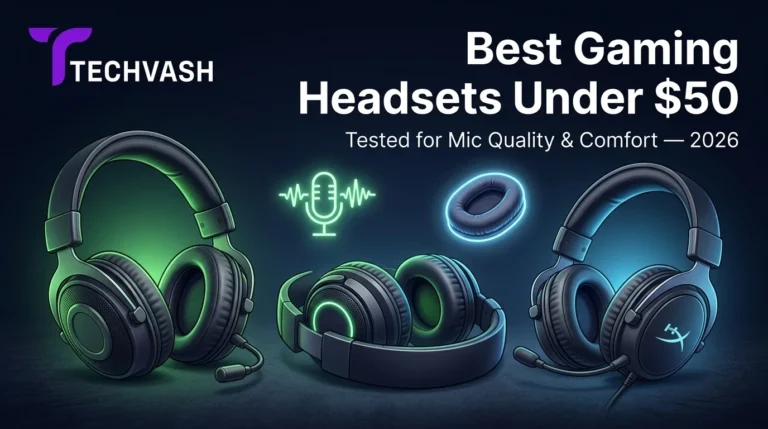
Your headset is the most personal piece of gaming gear you own. It sits on your head for hours. A bad one causes headaches, ear fatigue, and missed audio cues that cost you rounds in competitive games.
The three specs that actually matter:
Driver size and tuning. Most gaming headsets use 40mm or 50mm drivers. Bigger isn’t automatically better — tuning matters more than size. A well-tuned 40mm driver will sound better than a poorly tuned 50mm one. Look for headsets with a relatively flat frequency response rather than exaggerated bass, which muddies footsteps and directional audio in competitive shooters.
Comfort and weight. This is the most underrated spec. A headset that sounds incredible but clamps too tightly or weighs 400g will become unbearable after two hours. Look for memory foam ear cushions, adjustable headbands, and a total weight under 300g for long gaming sessions.
Microphone quality. If you play multiplayer games or stream, your mic quality matters to your teammates more than your audio quality matters to you. Look for a detachable or flip-to-mute boom mic with noise cancellation. Built-in mics on wireless headsets are almost always worse than dedicated boom mics.
Budget Pick (Under $50)
HyperX Cloud Stinger 2 remains the go-to recommendation at this price point. It’s lightweight (270g), comfortable for extended sessions, and has a surprisingly decent microphone for the price. The audio profile leans slightly bass-heavy, which is fine for single-player games but not ideal for competitive shooters where you need clear directional cues. Wired connection only — no wireless option at this price.
Mid-Range Pick ($50–$150)
SteelSeries Arctis Nova 5 offers the best balance of audio quality, comfort, and features in this range. It includes both wired and 2.4GHz wireless connectivity, a retractable ClearCast microphone with AI noise cancellation, and a lightweight design (267g) that’s comfortable for 6+ hour sessions. The audio profile is more neutral than budget options, making it suitable for both competitive and casual gaming.
Razer BlackShark V2 HyperSpeed is the strong alternative if you prioritize competitive FPS audio. Its THX Spatial Audio provides excellent directional sound, and the HyperClear cardioid mic is one of the best in this price range.
Premium Pick ($150+)
Audeze Maxwell stands out in the premium tier with its planar magnetic drivers — a technology borrowed from audiophile headphones that delivers exceptional detail and soundstage. The trade-off is slightly higher weight (390g), which may cause fatigue during marathon sessions. For competitive gamers who prioritize pinpoint directional audio and don’t mind the weight, it’s the best-sounding wireless gaming headset available in 2026.
Logitech G PRO X 2 Lightspeed is the lighter alternative (320g) with graphene drivers, excellent build quality, and the reliability that makes it a staple in professional esports.
Gaming Keyboards: Mechanical, Membrane, or Something New?
The keyboard debate in 2026 is more nuanced than “mechanical good, membrane bad.” New technologies like Hall effect magnetic switches and rapid-trigger actuation have changed the competitive landscape, while membrane keyboards have quietly improved enough to satisfy most casual gamers.
The buying criteria that matter:
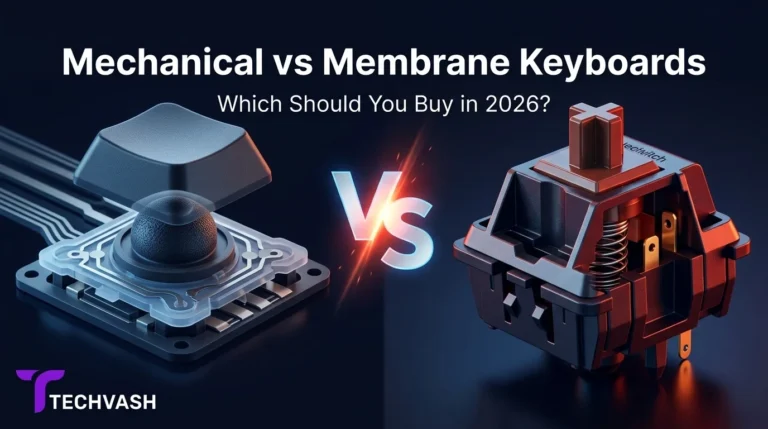
Switch type. Mechanical switches come in three main flavors: linear (smooth, no tactile bump — preferred for gaming), tactile (a bump you feel at the actuation point — preferred for typing), and clicky (a bump plus an audible click — satisfying but loud). In 2026, Hall effect magnetic switches (like Wooting’s Lekker switches or Razer’s Analog Optical switches) allow you to adjust the actuation point via software, giving you the flexibility to switch between gaming and typing profiles without changing hardware.
Polling rate. This measures how often the keyboard reports your keypresses to your computer. Standard is 1,000Hz (once per millisecond). Competitive keyboards in 2026 push 4,000Hz or even 8,000Hz, which reduces input latency to fractions of a millisecond. The difference is imperceptible to most players but measurable in competitive esports.
Form factor. Full-size (104 keys), tenkeyless/TKL (87 keys, no number pad), 75% (compact with function row), 65% (compact without function row), and 60% (minimal). Smaller form factors save desk space and allow more mouse movement area, which matters for low-sensitivity FPS players.
Redragon K552 Kumara is a TKL mechanical keyboard with Outemu Blue switches (clicky) that delivers genuine mechanical feel at a fraction of the cost of premium boards. The build quality is solid for the price — metal frame, double-shot keycaps, and basic red backlighting. The clicky switches are loud, which may annoy roommates or family members, but the tactile feedback is satisfying for both gaming and typing.
If you prefer a quieter experience, the Royal Kludge RK61 offers hot-swappable switches in a compact 60% form factor with Bluetooth and 2.4GHz wireless connectivity — features that were unheard of at this price a few years ago.
Mid-Range Pick ($50–$150)
Keychron Q1 Pro is the standout in this range. It’s a 75% wireless mechanical keyboard with a gasket-mount design that provides a premium typing feel, hot-swappable switches (so you can customize the feel without soldering), and QMK/VIA firmware support for deep key remapping. It connects via Bluetooth, 2.4GHz wireless, or USB-C wired, making it versatile for both gaming and productivity.
Wooting 60HE+ is the competitive gamer’s choice in this range. Its Hall effect magnetic switches with rapid-trigger technology allow for instant key actuation and deactivation, giving you a measurable advantage in games that rely on quick strafing and counter-strafing (Valorant, CS2, Overwatch 2). The rapid-trigger feature alone has made Wooting the dominant keyboard in professional FPS esports in 2026.
Premium Pick ($150+)
Wooting 80HE takes the Hall effect technology from the 60HE+ and puts it in a TKL form factor with a premium aluminum case, gasket mount, and 8,000Hz polling rate. It’s the most technologically advanced gaming keyboard available in 2026, and the price reflects it. If you’re a competitive FPS player who wants every possible input advantage, this is the endgame board.
Corsair K100 Air is the premium alternative for players who want a full-size layout with a dedicated macro wheel, media controls, and Corsair’s iCUE software ecosystem for RGB synchronization across all their peripherals.
Gaming Mice: Finding the Right Fit for Your Hand
Your mouse is the most important peripheral for competitive gaming. A headset affects what you hear. A keyboard affects what you type. A mouse directly controls your aim, and even a few grams of weight or millimeters of sensor inaccuracy can be the difference between a headshot and a miss.
The specs that actually impact performance:
Sensor accuracy. In 2026, most gaming mice use optical sensors with 20,000+ DPI tracking. At this level, sensor accuracy is essentially a solved problem — even budget mice have sensors that exceed human capability. Don’t overpay for DPI numbers. A 30,000 DPI sensor isn’t meaningfully better than a 20,000 DPI sensor for gaming.
Weight. The trend toward ultralight mice (under 60g) continues in 2026. Lighter mice require less force to accelerate and decelerate, reducing wrist fatigue during long sessions and enabling faster flick shots. The sweet spot for most players is 50–70g. Heavier mice (90g+) are still preferred by some players who like the stability and momentum of a weightier device.
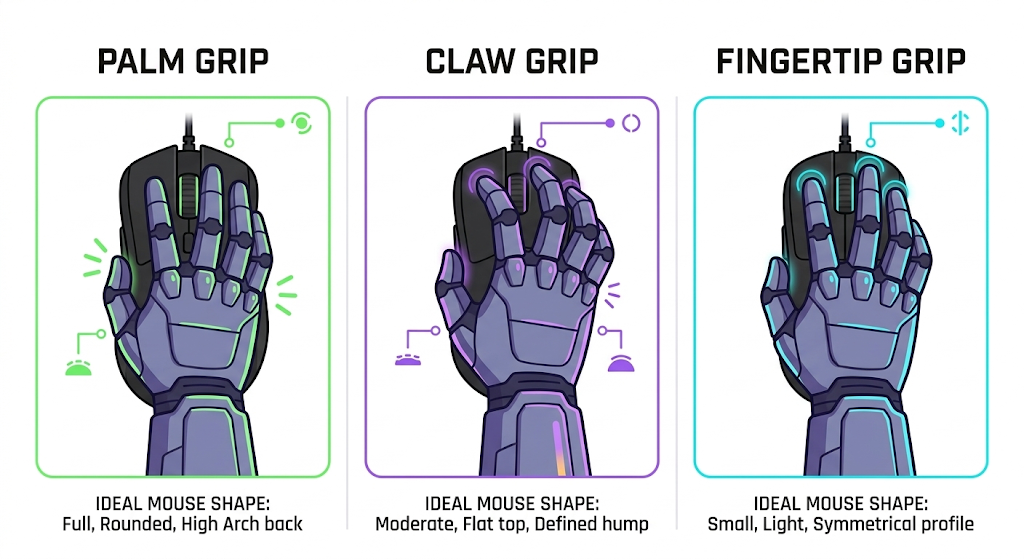
Shape and grip style. This is the most important factor and the one most buyers ignore. Your grip style — palm (full hand resting on the mouse), claw (fingertips arched, palm touching the back), or fingertip (only fingertips touching) — determines which mouse shape will feel comfortable. A mouse that’s perfect for a palm gripper will feel terrible for a fingertip gripper, regardless of specs.
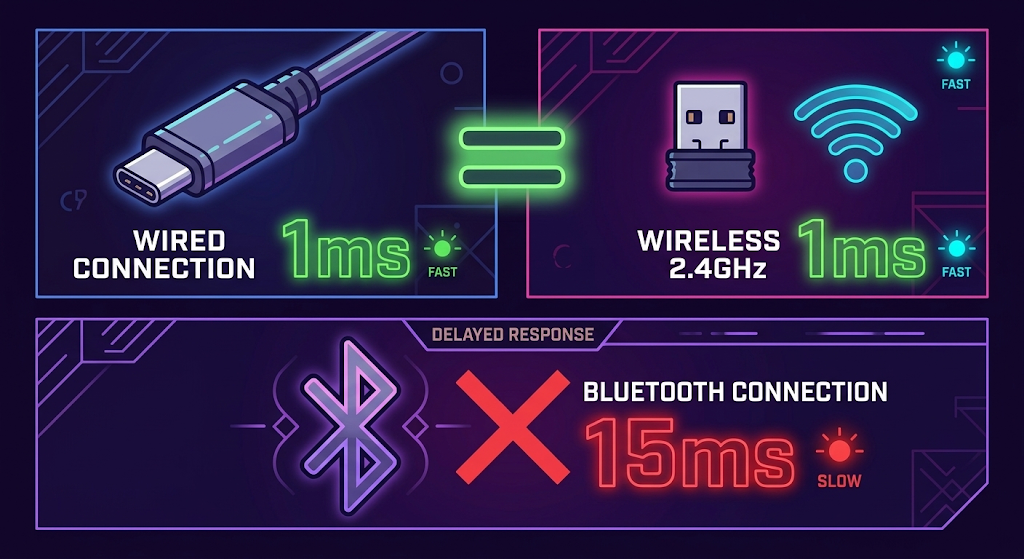
Wireless latency. In 2026, the wireless latency gap has effectively closed. Modern 2.4GHz wireless gaming mice from Logitech, Razer, and SteelSeries report at 1,000–4,000Hz with latency indistinguishable from wired connections. Bluetooth is still too slow for competitive gaming but fine for casual use.
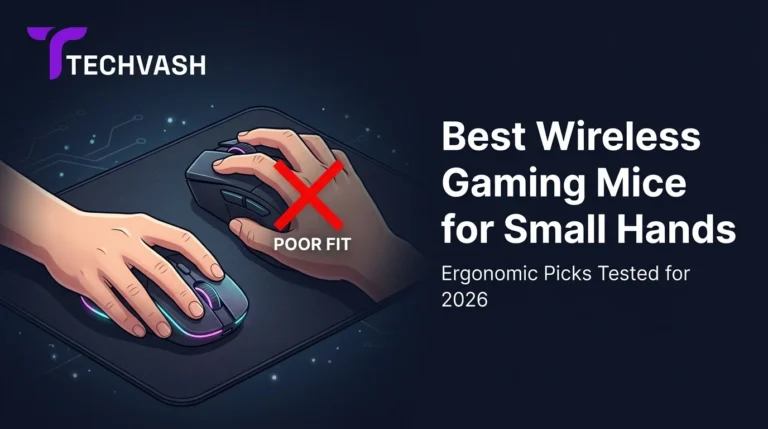
For players with smaller hands, finding the right mouse is especially challenging. See our Best Wireless Gaming Mice for Small Hands guide for ergonomic picks specifically designed for compact grips.
Budget Pick (Under $50)
Logitech G305 Lightspeed remains the best budget wireless gaming mouse in 2026, years after its release. It uses a HERO 12K sensor (more than sufficient for gaming), weighs 99g with a AA battery (or ~80g with a lithium AAA adapter), and delivers Logitech’s reliable Lightspeed wireless with no perceptible latency. The shape is a safe, ambidextrous-friendly design that works for most grip styles.
Razer Viper Mini (wired) is the alternative for players who want an ultralight mouse (61g) on a tight budget. Its compact shape is ideal for claw and fingertip grippers, and the optical switches eliminate double-clicking issues that plague mechanical switch mice over time.
Mid-Range Pick ($50–$150)
Logitech G PRO X Superlight 2 is the most popular gaming mouse in professional esports for good reason. At 60g, it’s featherlight without sacrificing build quality. The HERO 2 sensor tracks flawlessly, the Lightspeed wireless is rock-solid, and the shape is a refined ambidextrous design that accommodates most grip styles. Battery life exceeds 90 hours on a single charge.
Razer DeathAdder V3 HyperSpeed is the right choice if you prefer an ergonomic right-handed shape over ambidextrous. Its contoured design is comfortable for palm and claw grippers, and the HyperSpeed wireless technology matches Logitech’s latency performance. At 55g, it’s one of the lightest ergonomic mice available.
Premium Pick ($150+)
Finalmouse UltralightX pushes the ultralight trend to its extreme at under 40g with a magnesium alloy chassis and a custom 4,000Hz polling rate. It’s the lightest high-performance gaming mouse available in 2026, and the build quality justifies the premium price for competitive players who demand the absolute minimum weight.
Logitech G PRO X Superlight 2 Dex is the premium ergonomic alternative, combining the Superlight 2’s internals with a right-handed ergonomic shell designed in collaboration with professional esports athletes.
Gaming Controllers: When a Mouse and Keyboard Aren’t the Best Choice
Not every game is better with a mouse and keyboard. Racing games, platformers, fighting games, and many third-person action titles feel more natural with a controller. And if you play across multiple platforms (PC, console, cloud gaming), a versatile controller is essential.
What to evaluate:
Hall effect joysticks. The biggest controller innovation in 2026 is the widespread adoption of Hall effect analog sticks, which use magnetic sensors instead of physical potentiometers. This eliminates stick drift — the gradual degradation that causes your character to move on their own — which has plagued traditional controllers for years. If you’re buying a new controller in 2026, prioritize Hall effect sticks.
Haptic feedback and adaptive triggers. Sony’s DualSense set the standard with its nuanced haptic motors and variable-resistance triggers. In 2026, more third-party controllers offer similar features, though implementation quality varies. Adaptive triggers are most impactful in single-player games that support them (racing, shooters with different weapon types).
Platform compatibility. Not all controllers work seamlessly with all platforms. Xbox controllers have native Windows support. PlayStation controllers require additional software (DS4Windows or Steam Input) for full PC functionality. Third-party controllers vary widely in their cross-platform support.
8BitDo Ultimate C offers Hall effect joysticks, Bluetooth and 2.4GHz wireless, and solid build quality at a price that undercuts the major first-party controllers. It’s compatible with PC, Nintendo Switch, and mobile devices. The haptic feedback is basic compared to premium options, but the stick accuracy and drift resistance make it the best value controller in 2026.
Mid-Range Pick ($50–$150)
Xbox Wireless Controller (2026 refresh) remains the default recommendation for PC gamers due to its seamless Windows integration, comfortable ergonomic shape, and reliable wireless connectivity. The 2026 version adds Hall effect sticks and USB-C charging, addressing the two biggest complaints about previous generations.
Sony DualSense is the better choice if you play games that support its haptic feedback and adaptive triggers natively. The immersive rumble and trigger resistance create a tactile experience that standard vibration motors can’t match. PC compatibility works through Steam Input, though some features require additional configuration.
Premium Pick ($150+)
Xbox Elite Wireless Controller Series 3 is the premium standard for competitive console and PC gaming. It features Hall effect sticks, adjustable-tension thumbsticks, interchangeable D-pads and stick caps, four rear paddles for remapping, and a swappable battery system. The customization options let you tailor the controller to your exact hand size and play style.
DualSense Edge is Sony’s premium alternative with hot-swappable stick modules (so you can replace a drifting stick without buying a new controller), customizable trigger dead zones, and rear function buttons. It’s the most feature-rich PlayStation controller available.
Gaming Monitors: The Single Biggest Upgrade You Can Make
Your monitor is the window through which you experience everything your PC produces. A powerful GPU pushing 200 FPS is wasted on a 60Hz monitor that can only display 60 of those frames. If you’re going to invest in one gaming gadget above all others, make it the monitor.
The three specs that define your experience:
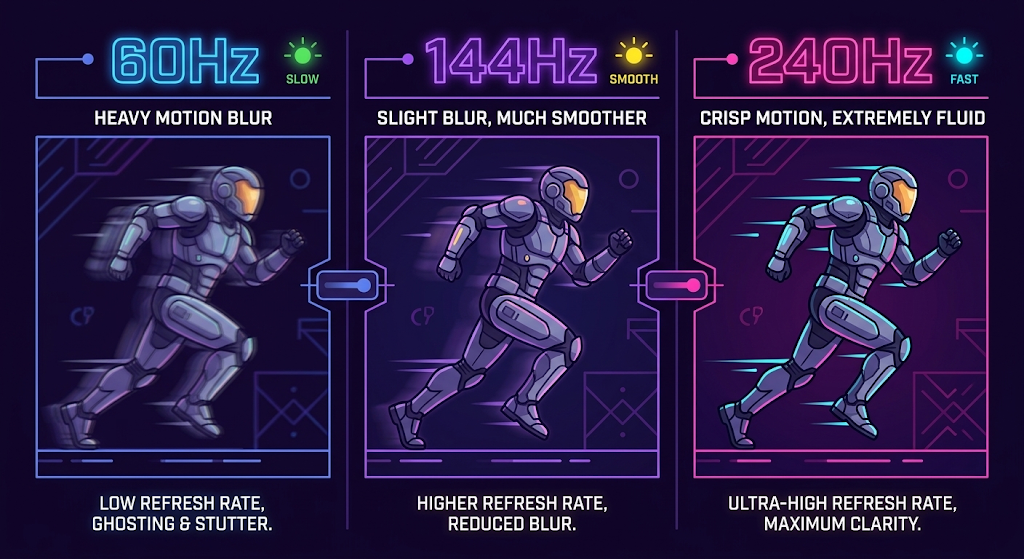
Refresh rate. Measured in Hz, this is how many times per second the monitor updates the image. 60Hz is the bare minimum. 144Hz is the current standard for gaming. 240Hz is the sweet spot for competitive players. 360Hz+ exists for professional esports but offers diminishing returns for most players. The jump from 60Hz to 144Hz is the most noticeable upgrade you’ll ever make — everything from mouse movement to scrolling feels smoother.
Response time. Measured in milliseconds (ms), this is how quickly a pixel changes color. Lower is better. 1ms GtG (gray-to-gray) is the target for gaming. Anything above 5ms will produce visible ghosting in fast-paced games.
Note that manufacturers often advertise “1ms MPRT” (motion picture response time), which is a different measurement and typically less accurate than GtG. Check independent reviews for real-world response times.
Panel type. IPS panels offer the best color accuracy and viewing angles, making them ideal for content creators who also game. VA panels offer deeper blacks and higher contrast ratios, better for dark-room gaming and single-player experiences.
TN panels have the fastest response times but the worst color reproduction — they’re increasingly rare in 2026 as IPS panels have closed the speed gap. OLED panels deliver perfect blacks, near-instant response times, and stunning HDR, but carry a risk of burn-in with static HUD elements and remain expensive.
Budget Pick (Under $200)
AOC 24G4 is a 24-inch 1080p IPS monitor with a 180Hz refresh rate and 1ms GtG response time. It covers 99% sRGB color gamut and includes AMD FreeSync Premium for tear-free gameplay. At this price, it delivers 90% of the experience of monitors costing twice as much. The 24-inch size is ideal for 1080p gaming — large enough to be immersive, small enough that pixel density remains sharp.
Mid-Range Pick ($200–$500)
LG 27GR83Q-B is a 27-inch 1440p IPS monitor with a 240Hz refresh rate, 1ms GtG response time, and excellent HDR400 performance. The 1440p resolution at 27 inches provides the ideal balance of sharpness and GPU demand — you get noticeably sharper visuals than 1080p without requiring a top-tier GPU to maintain high frame rates.
ASUS ROG Strix XG27AQDMG is the OLED alternative in this range. Its 27-inch 1440p QD-OLED panel delivers perfect blacks, 0.03ms response time, and 240Hz refresh rate. The visual quality is stunning, but be aware of OLED burn-in risk if you play games with static HUD elements for extended periods.
Premium Pick ($500+)
Samsung Odyssey OLED G9 (2026) is a 49-inch ultrawide QD-OLED monitor with a 5120×1440 resolution, 240Hz refresh rate, and 0.03ms response time. It replaces a dual-monitor setup with a single seamless curve that wraps around your peripheral vision. The immersion in racing games, flight simulators, and open-world titles is unmatched. The trade-off is the massive desk space required and the premium price.
Alienware AW3225QF is the 4K OLED option for players who prioritize resolution over refresh rate. Its 32-inch 4K QD-OLED panel runs at 240Hz with DisplayPort 2.1, delivering the sharpest gaming image available in 2026. You’ll need a powerful GPU (RTX 5080 or equivalent) to drive 4K at high frame rates.
Essential Gaming Accessories You Didn’t Know You Needed
Mousepad (Extended / Desk Mat)
A large desk mat (900×400mm or larger) provides a consistent tracking surface for both your mouse and keyboard. In 2026, the best value pick is the Artisan Zero for competitive players who need a controlled glide, or the Lethal Gaming Gear Saturn Pro for an all-rounder that balances speed and control. Budget option: SteelSeries QcK XXL at under $20.
Capture Card (For Streamers)
If you stream console gameplay to a PC, the Elgato HD60 X captures 4K60 HDR passthrough with 1080p60 recording. For budget streamers, the EVGA XR1 Lite handles 1080p60 capture at under $50.
Controller Charging Station
Stop leaving dead controllers on your desk. The PowerA Dual Charging Dock (for Xbox or PlayStation) charges two controllers simultaneously and keeps them organized. Under $25 and eliminates the “my controller died mid-match” problem.
Cable Management Kit
A $10–$15 cable management kit (velcro ties, under-desk clips, cable sleeves) transforms a messy setup into a clean one. It’s not a performance upgrade, but it reduces cable snagging on your mouse and makes your setup look significantly more professional on camera if you stream.
Budget Allocation Guide: Where to Spend and Where to Save
If you have a limited budget and need to prioritize, here’s the order that delivers the most impact per dollar:
Priority
Gadget
Why
1
Monitor
The most visible upgrade. 60Hz to 144Hz transforms your experience.
2
Mouse
Directly affects aim and comfort. A well-fitting mouse improves performance immediately.
3
Headset
Audio cues win rounds in competitive games. Comfort prevents fatigue.
4
Keyboard
Important but less impactful than mouse and monitor for most game genres.
5
Controller
Essential for specific genres (racing, platformers) but optional for FPS/RTS players.
6
Accessories
Nice to have but not performance-critical.
The golden rule: Spend more on the things your body touches directly (mouse, headset, keyboard) and the thing your eyes look at (monitor). Save on everything else.
Frequently Asked Questions
What is the most important gaming gadget to upgrade first?
Your monitor. The difference between a 60Hz and 144Hz display is the single most noticeable improvement you can make to your gaming setup. It affects every game, every application, and even general desktop use. After the monitor, upgrade your mouse — it’s the primary input device for most games and the one most likely to cause discomfort or performance issues if it doesn’t fit your hand.
Are wireless gaming peripherals as good as wired in 2026?
Yes, for practical purposes. Modern 2.4GHz wireless technology from Logitech (Lightspeed), Razer (HyperSpeed), and SteelSeries (Quantum Wireless) delivers latency that is indistinguishable from wired connections in blind tests. The only remaining advantage of wired is that you never need to charge. Bluetooth is still too slow for competitive gaming but acceptable for casual use.
Do I need a 4K monitor for gaming?
Not unless you have a high-end GPU and prioritize visual fidelity over frame rate. 1440p at 240Hz is the sweet spot for most gamers in 2026 — it provides sharp visuals without requiring a $1,500 GPU to maintain competitive frame rates. 4K is worth it for single-player cinematic experiences if your hardware can handle it, but it’s overkill for competitive multiplayer.
How much should I spend on a complete gaming peripheral setup?
A solid complete setup (headset, keyboard, mouse, mousepad) costs $150–$300 at the budget-to-mid-range level. A premium setup with high-end peripherals runs $500–$800. The monitor is a separate investment — budget $200–$500 for a quality gaming display. Total peripheral budget for a well-rounded setup: $350–$800 depending on your priorities.
Are RGB lights worth the extra cost?
RGB lighting has zero impact on gaming performance. It’s purely aesthetic. If you enjoy the look and it fits your budget, go for it. If you’re choosing between a better sensor and more RGB, always choose the better sensor. Some players find RGB distracting in dark rooms and disable it entirely.