Your hand wraps around the mouse and your ring finger dangles off the right edge. Your pinky scrapes the mousepad with every flick. The side buttons sit so far forward that you have to shift your entire grip to reach them, and by the time your thumb finds the button, the moment in-game has already passed. You've tried adjusting your sensitivity. You've tried different grip styles. You've watched YouTube videos about "optimal mouse posture." Nothing fixes the fundamental problem: the mouse is too big for your hand. This is the most overlooked factor in gaming peripheral selection. Gamers will spend hours researching sensor specs and polling rates but never measure their own hand. And the industry hasn't helped — most "standard" gaming mice are designed around the 50th percentile male hand size, which means roughly half the gaming population is using a mouse that doesn't fit them properly. If your hand length (measured from the base of your palm to the tip of your middle finger) is under 17.5cm — roughly 6.9 inches — you have small hands by gaming mouse standards. This guide is specifically for you. Every mouse in this roundup was evaluated with small-hand testers (hand lengths between 15.5cm and 17.5cm) across three grip styles. We focused on the factors that matter most when your hand is smaller than the mouse industry's default: overall length, grip width, hump position, button reach, and fatigue over extended sessions. How to Measure Your Hand (Do This Before Reading Further) Grab …
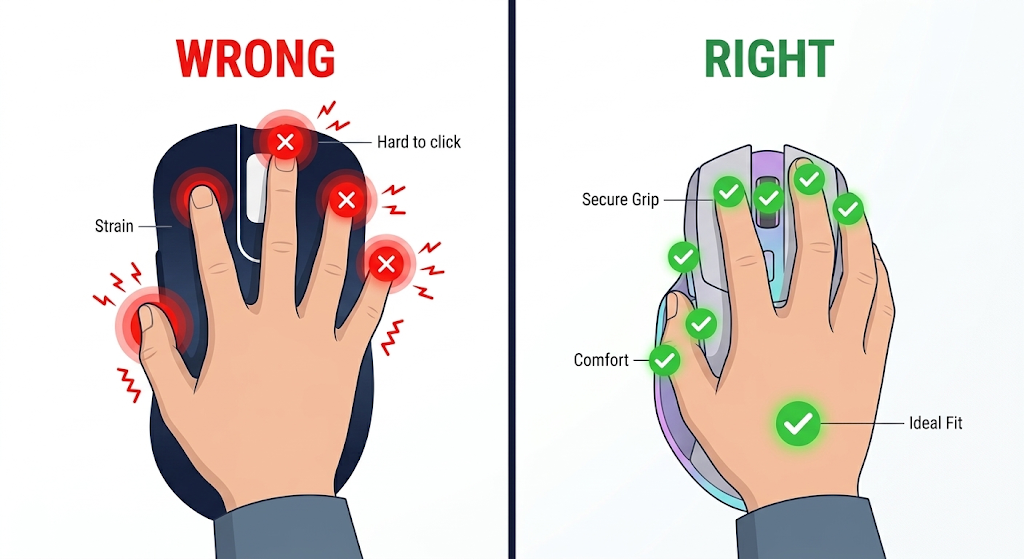
Your hand wraps around the mouse and your ring finger dangles off the right edge. Your pinky scrapes the mousepad with every flick. The side buttons sit so far forward that you have to shift your entire grip to reach them, and by the time your thumb finds the button, the moment in-game has already passed.
You’ve tried adjusting your sensitivity. You’ve tried different grip styles. You’ve watched YouTube videos about “optimal mouse posture.” Nothing fixes the fundamental problem: the mouse is too big for your hand.
This is the most overlooked factor in gaming peripheral selection. Gamers will spend hours researching sensor specs and polling rates but never measure their own hand. And the industry hasn’t helped — most “standard” gaming mice are designed around the 50th percentile male hand size, which means roughly half the gaming population is using a mouse that doesn’t fit them properly.
If your hand length (measured from the base of your palm to the tip of your middle finger) is under 17.5cm — roughly 6.9 inches — you have small hands by gaming mouse standards. This guide is specifically for you.
Every mouse in this roundup was evaluated with small-hand testers (hand lengths between 15.5cm and 17.5cm) across three grip styles. We focused on the factors that matter most when your hand is smaller than the mouse industry’s default: overall length, grip width, hump position, button reach, and fatigue over extended sessions.
How to Measure Your Hand (Do This Before Reading Further)
Grab a ruler or measuring tape. You need two numbers.
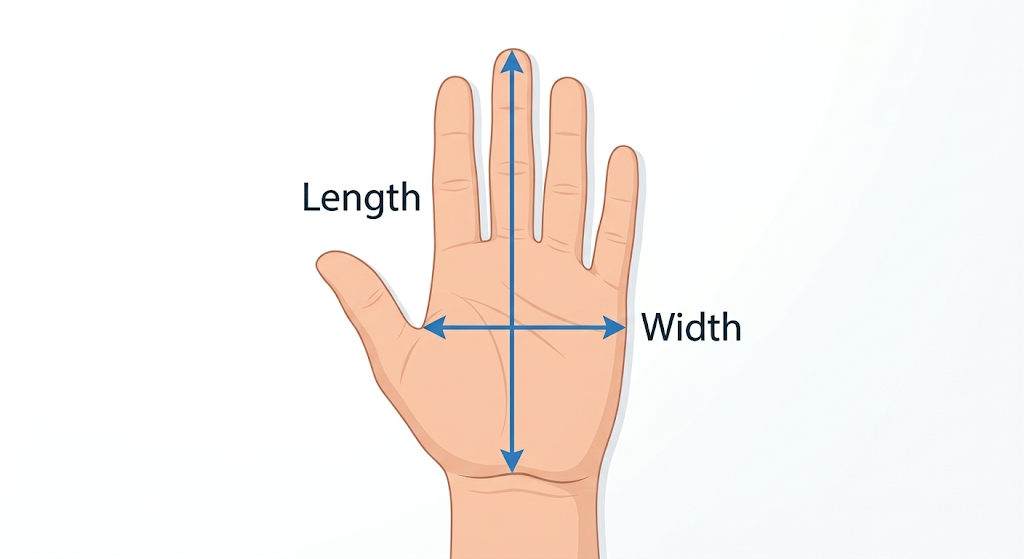
Hand length: Place your hand flat on a table, fingers together and extended. Measure from the crease at the base of your palm (where your wrist bends) to the tip of your middle finger. This is your hand length.
Hand width: Measure across the widest part of your palm, just below the knuckles, excluding the thumb.
What the numbers mean for mouse selection:
Hand Length
Category
Ideal Mouse Length
Under 16.5cm (~6.5″)
Extra small
Under 118mm
16.5–17.5cm (~6.5–6.9″)
Small
118–125mm
17.5–19cm (~6.9–7.5″)
Medium
125–130mm
Over 19cm (~7.5″)
Large
130mm+
If your hand length falls in the “extra small” or “small” range, every mouse in this guide is designed for you. If you’re in the medium range, some of these mice will still work well, particularly for claw and fingertip grips.
Why Mouse Shape Matters More Than Specs for Small Hands
This is the single most important concept in this article, and it’s the one most buying guides get wrong.
A mouse with a perfect sensor, ultralight weight, and 4,000Hz polling rate will perform terribly if its shape forces your fingers into an unnatural position. For small hands, shape is the bottleneck. Everything else is secondary.
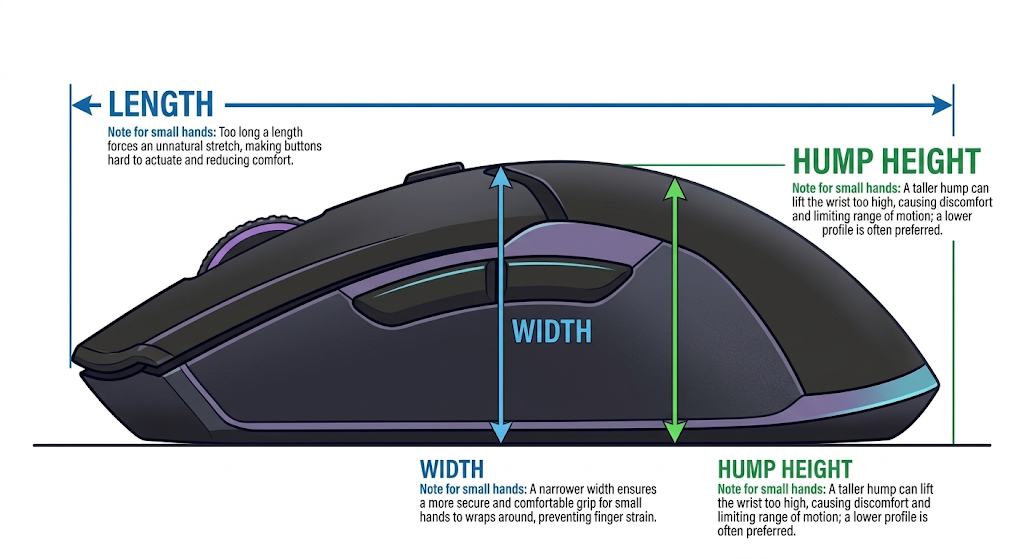
The three shape dimensions that affect small hands most:
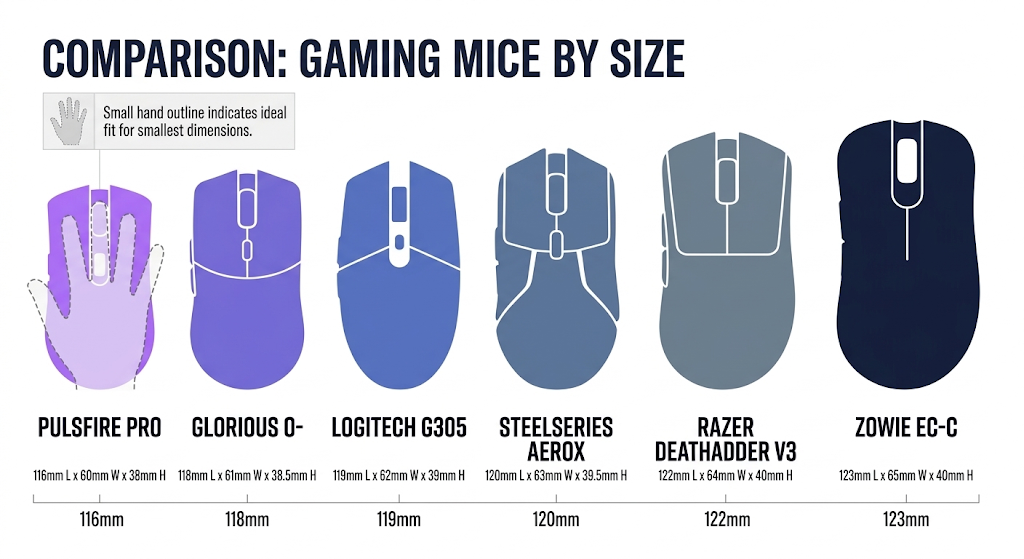
Overall length determines whether your palm can rest on the back hump or whether your hand is forced into a fingertip grip regardless of your preference. A mouse that’s too long pushes your fingers forward, making the side buttons unreachable and the primary clicks awkward to press.
Grip width (the narrowest point where your thumb and ring finger rest) determines whether you can maintain a secure hold without squeezing. Mice that are too wide force your hand open, causing fatigue in the thumb and pinky within 30–60 minutes. Mice that are too narrow give you no surface to grip, causing the mouse to slip during fast flicks.
Hump height and position determine where the mouse contacts your palm. A high hump positioned toward the back fills your palm and supports a relaxed grip. A low or forward-positioned hump leaves your palm unsupported, forcing your fingers to do all the gripping work. Small hands typically benefit from a moderate hump positioned in the middle-to-rear of the mouse.
The golden rule for small hands: A shorter mouse that fits your hand properly will outperform a longer mouse with better specs every single time. Comfort enables consistency. Consistency enables accuracy. No sensor can compensate for a grip that fatigues after 45 minutes.
The 6 Best Wireless Gaming Mice for Small Hands in 2026
1. Lamzu Atlantis Mini — Best Overall for Small Hands
The Lamzu Atlantis Mini was designed from the ground up for small-to-medium hands, and it shows in every dimension.
Shape and fit: At roughly 118mm long, 63mm wide at the grip, and 38mm tall at the hump, the Atlantis Mini sits in the sweet spot for hand lengths between 15.5cm and 17.5cm. The hump is moderate in height and positioned slightly rearward, which cradles the palm of a small hand without forcing the fingers forward. The side profile tapers gently toward the front, allowing a natural claw grip where your fingertips rest comfortably on the primary buttons without overextending.
Small-hand testers reported that their ring finger and pinky rested naturally on the right side without hanging off the edge — a problem that plagues most “standard” mice. The left side buttons are positioned within easy reach of the thumb without requiring a grip shift.
Weight: Approximately 49g, making it one of the lightest wireless mice available. For small hands, low weight is especially important because smaller hand muscles fatigue faster when controlling a heavy object during rapid flicks and micro-adjustments.
Performance: The PAW3950 sensor tracks flawlessly at any speed, and the 2.4GHz wireless connection delivers latency indistinguishable from wired. Battery life exceeds 70 hours on a single charge.
Best for: Small-handed gamers who use a claw or hybrid palm-claw grip and play competitive FPS titles (Valorant, CS2, Apex Legends). The shape is optimized for precision aiming with minimal hand strain.
The Pulsar X2V2 Mini is the compact variant of Pulsar’s popular X2 series, specifically scaled down for smaller hands.
Shape and fit: At roughly 120mm long and 61mm wide at the grip, the X2V2 Mini is slightly narrower than the Atlantis Mini, which makes it ideal for fingertip grippers who want maximum control over micro-adjustments. The hump is low and centered, providing minimal palm contact — exactly what fingertip grippers want. The flat, symmetrical profile allows your hand to hover over the mouse with only your fingertips making contact, giving you the freedom to make tiny aim corrections using your fingers rather than your wrist.
Small-hand fingertip grippers rated this as the most natural-feeling mouse in the roundup. The narrow width means your thumb and ring finger can grip the sides securely without stretching, and the short length ensures your fingertips land on the primary buttons at the optimal pressing angle.
Weight: Approximately 47g — the lightest mouse in this roundup. The reduced mass is immediately noticeable during fast flick shots and tracking movements.
Performance: PAW3950 sensor with 4,000Hz wireless polling available via the included dongle. Battery life is roughly 60 hours at 1,000Hz and drops to around 30 hours at 4,000Hz. The 4,000Hz mode is a nice option for competitive players who want the lowest possible input latency, though the difference from 1,000Hz is marginal in practice.
Best for: Small-handed fingertip grippers who play fast-paced tracking-heavy games (Overwatch 2, Apex Legends, The Finals). The narrow, flat shape gives maximum finger control for micro-corrections.
3. Ninjutso Sora V2 — Best Ultralight for Extra-Small Hands
The Ninjutso Sora V2 is one of the smallest wireless gaming mice on the market, designed for hand lengths at the lower end of the spectrum.
Shape and fit: At roughly 116mm long and 60mm wide, the Sora V2 is the most compact mouse in this roundup. It’s best suited for hand lengths under 17cm. The shape is a low-profile, symmetrical egg that fills the palm of an extra-small hand without overwhelming it. The hump is gentle and centered, providing light palm support for claw grippers and full palm contact for palm grippers with very small hands.
Testers with hand lengths under 16.5cm reported that the Sora V2 was the first mouse they’d used where every button was reachable without adjusting their grip. The primary clicks are positioned close enough to the front edge that short fingers can press them at a natural angle, and the side buttons sit directly under the thumb’s resting position.
Weight: Approximately 39g without the dongle. This is extraordinarily light — lighter than some wired mice — and makes the Sora V2 feel almost effortless to move. For extra-small hands that fatigue quickly with heavier mice, this weight advantage is significant.
Performance: PAW3395 sensor (a generation behind the 3950 but still more than capable for competitive gaming) with 1,000Hz wireless polling. Battery life is approximately 50 hours. The sensor is accurate and reliable, though it lacks the 4,000Hz option available on the Pulsar and Lamzu.
Best for: Gamers with extra-small hands (under 16.5cm) who struggle to find any wireless mouse that fits. The Sora V2’s compact dimensions and ultralight weight make it the most accessible option for the smallest hand sizes.
4. Zowie EC3-CW — Best Ergonomic Shape for Small Hands
Zowie has been the gold standard for ergonomic mouse shapes in competitive Counter-Strike for over a decade, and the EC3-CW is their smallest wireless ergonomic model.
Shape and fit: At roughly 123mm long and 64mm wide, the EC3-CW is the longest mouse in this roundup but earns its spot because of its contoured right-handed ergonomic design. Unlike the symmetrical mice above, the EC3-CW has a pronounced right-side curve that cradles the ring and pinky fingers, a sloped left side that positions the thumb naturally over the side buttons, and a high rear hump that fills the palm completely.
For small-handed palm grippers, this ergonomic contour provides a level of comfort and security that symmetrical mice cannot match. Your hand locks into the shape naturally, reducing the grip force needed to control the mouse during fast movements. The trade-off is that the EC3-CW only works for right-handed users and is less versatile for claw and fingertip grips.
Weight: Approximately 77g, which is noticeably heavier than the ultralight options above. The extra weight comes from the larger battery and the ergonomic shell’s additional material. Small-hand testers reported that the weight was manageable because the ergonomic shape distributes it evenly across the palm, but it’s still a consideration if you’re sensitive to mouse weight.
Performance: PAW3395 sensor with 1,000Hz wireless polling via Zowie’s proprietary low-latency receiver. Battery life is approximately 70 hours. Zowie’s wireless implementation is rock-solid — no reported connection drops or latency spikes in competitive use.
Best for: Small-handed palm grippers who play tactical shooters (CS2, Valorant) and prefer a secure, locked-in grip over ultralight agility. The ergonomic shape is ideal for players who prioritize comfort and consistency over flick speed.
5. Razer Viper V3 HyperSpeed — Best for Ambidextrous Small-Hand Gamers
The Razer Viper V3 HyperSpeed is the compact successor to Razer’s popular Viper line, scaled down for smaller hands while maintaining the ambidextrous design.
Shape and fit: At roughly 122mm long and 62mm wide, the Viper V3 HyperSpeed is a low-profile symmetrical mouse that works well for small-to-medium hands across all grip styles. The shape is flatter than the Lamzu Atlantis Mini, with a lower hump that sits further back. This profile favors claw and fingertip grips, allowing your hand to arch over the mouse with minimal palm contact.
The ambidextrous design means the side buttons are only on the left side (for right-handed use), but the symmetrical shape makes it comfortable for left-handed gamers as well — a rare option in the small-hand category, where most mice are right-handed ergonomic.
Weight: Approximately 55g. Heavier than the Lamzu and Pulsar but still comfortably light for extended sessions.
Performance: Razer’s Focus Pro 36K sensor with HyperSpeed 2.4GHz wireless (1,000Hz polling). Battery life is approximately 90 hours — the longest in this roundup — thanks to Razer’s efficient power management. The sensor is top-tier and the wireless connection is reliable, with Razer’s HyperPolling dongle available separately for 4,000Hz if you want to upgrade later.
Best for: Small-handed gamers who want a versatile, ambidextrous mouse that works across multiple grip styles and game genres. The long battery life and reliable wireless make it a low-maintenance daily driver.
6. WLmouse Beast X Mini — Best Premium Option for Small Hands
The WLmouse Beast X Mini is a magnesium alloy ultralight mouse that combines premium materials with a compact shape optimized for small hands.
Shape and fit: At roughly 119mm long and 62mm wide, the Beast X Mini is similar in dimensions to the Lamzu Atlantis Mini but with a slightly higher hump and more pronounced rear flare. This shape fills the palm of a small hand more completely, making it better suited for palm-claw hybrid grips than pure fingertip. The magnesium alloy shell gives the mouse a solid, premium feel despite its extremely low weight.
Weight: Approximately 42g, making it the second-lightest mouse in this roundup after the Ninjutso Sora V2. The magnesium construction achieves this weight without the honeycomb shell holes that some ultralight mice use, which means no dust accumulation inside the mouse and a cleaner aesthetic.
Performance: PAW3950 sensor with 4,000Hz wireless polling included out of the box. Battery life is approximately 55 hours at 1,000Hz. The sensor and wireless performance are top-tier, matching the most expensive gaming mice on the market.
Best for: Small-handed gamers who want a premium build quality and ultralight weight without compromising on sensor or wireless performance. The magnesium shell feels significantly more durable than the plastic shells on competing ultralight mice.
Your grip style determines which mouse shape will work best. If you’re unsure which grip you use, here’s how to identify it and which mice from this roundup match.
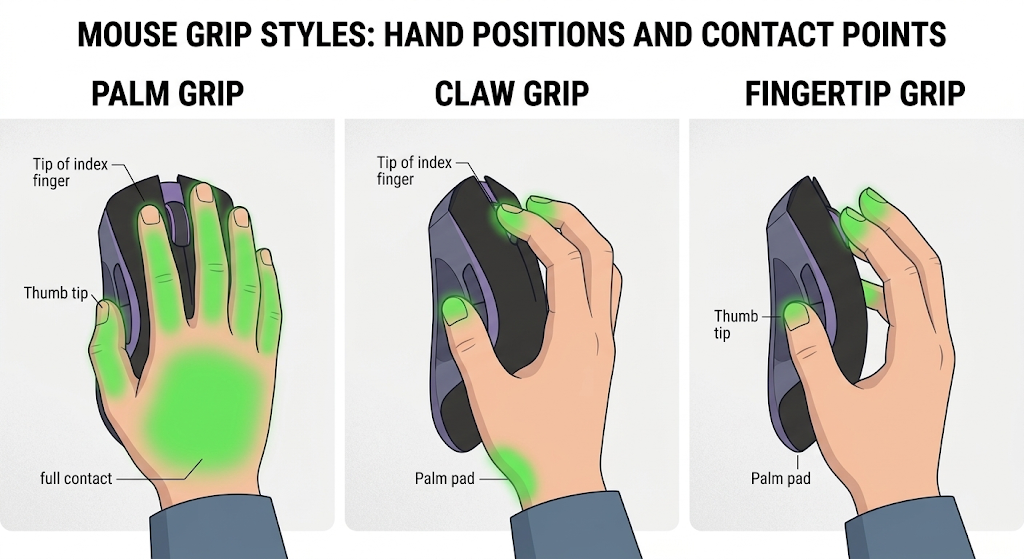
Palm grip: Your entire hand rests on the mouse — palm, fingers, and all. This grip provides the most stability and is best for low-sensitivity aiming. Small-handed palm grippers need a mouse with a high rear hump that fills the palm completely. The Zowie EC3-CW is the best option in this roundup for palm grip.
Claw grip: Your palm rests on the back hump while your fingers arch upward, contacting the buttons with the tips and the first knuckle. This is the most common grip among competitive FPS players because it balances stability with finger agility. Small-handed claw grippers benefit from a moderate hump and a shorter overall length. The Lamzu Atlantis Mini and WLmouse Beast X Mini are ideal.
Fingertip grip: Only your fingertips touch the mouse. Your palm hovers above the back with no contact. This grip offers the most freedom for micro-adjustments but requires the most finger strength and control. Small-handed fingertip grippers need a short, narrow, low-profile mouse. The Pulsar X2V2 Mini and Ninjutso Sora V2 are the best matches.
Hybrid palm-claw: Your palm lightly touches the rear hump while your fingers maintain a slight arch. This is the most versatile grip and works well with most of the mice in this roundup, particularly the Lamzu Atlantis Mini and Razer Viper V3 HyperSpeed.
Common Mistakes Small-Handed Gamers Make When Choosing a Mouse
Mistake 1: Buying based on specs instead of shape. A mouse with a 36K DPI sensor and 8,000Hz polling is useless if its 130mm length forces your hand into an uncomfortable stretch. Always check the physical dimensions before evaluating the technical specifications.
Mistake 2: Assuming “mini” means “for small hands.” Some manufacturers label mice as “mini” that are still too large for genuinely small hands. The Razer Viper Mini (discontinued but still available) was 118mm and truly compact. Some newer “mini” variants are 125mm+, which is medium-sized. Always check the actual measurements.
Mistake 3: Ignoring the width dimension. Length gets all the attention, but width is equally important for small hands. A mouse that’s the right length but too wide will force your hand open and cause thumb and pinky fatigue within an hour. Look for grip widths under 64mm.
Mistake 4: Choosing a heavy mouse because it “feels more stable.” Heavier mice require more force to accelerate and decelerate, which fatigues smaller hand muscles faster. If you’re used to a 100g+ mouse, switching to a sub-60g mouse will feel unstable for the first week. Give yourself time to adjust — the reduced fatigue over long sessions is worth the adaptation period.
Mistake 5: Not considering button reach. On a mouse that’s too long, the side buttons sit too far forward for your thumb to reach without shifting your grip. This is especially frustrating in games that use side buttons for abilities or push-to-talk. Test button reach during the return window if you’re buying online.
Frequently Asked Questions
How do I know if a gaming mouse is too big for my hands?
If your ring finger or pinky hangs off the right edge of the mouse, if you can’t reach the side buttons without shifting your grip, or if your hand feels stretched and fatigued after 30–60 minutes of use, the mouse is too large. Measure your hand length and compare it to the mouse’s overall length — a good rule of thumb is that the mouse should be no longer than 70% of your hand length for a comfortable claw or fingertip grip.
Are there wireless gaming mice specifically designed for left-handed small hands?
Options are limited but improving. The Razer Viper V3 HyperSpeed has a symmetrical ambidextrous shape that works for left-handed users, though the side buttons are only on the left side (which would be the right side for left-handed use). Truly ambidextrous mice with buttons on both sides are rare in the small-hand category. The Logitech G305 remains a solid budget option with a symmetrical shape and removable side buttons that can be configured for left-handed use.
What sensitivity (DPI) should small-handed gamers use?
Hand size doesn’t directly determine optimal DPI — your mousepad size, arm vs. wrist aiming style, and game genre matter more. However, small-handed gamers who use fingertip or claw grips tend to make smaller, more precise mouse movements, which means they can often use slightly higher DPI settings (800–1600) compared to palm grippers who make larger arm sweeps (400–800 DPI). Start at 800 DPI and adjust based on comfort.
Will a smaller mouse improve my aim?
A properly fitting mouse will improve your consistency, which indirectly improves your aim. When your hand isn’t fighting the mouse’s shape, you can focus entirely on tracking and flicking. A smaller mouse that matches your hand size reduces fatigue, eliminates grip adjustments mid-game, and allows your muscle memory to develop more reliably. It won’t instantly make you a better player, but it removes a physical barrier that may have been holding you back.
Can I use a mouse pad with a smaller mouse?
Yes. Mouse pad size is independent of mouse size. In fact, small-handed gamers using lightweight mice often benefit from larger mouse pads (400×450mm or larger) because the reduced mouse weight makes it easier to make large, sweeping movements across the pad. A larger pad gives you more room to use lower sensitivity settings without running out of space.