Is Free Antivirus Enough in 2026? 7 Cybersecurity Myths That Put You at Risk
You installed a free antivirus program three years ago. You see the little green shield icon in your system tray every day. It tells you you're "protected." So you assume you're safe. That assumption is one of the most dangerous things in your digital life right now. The cybersecurity landscape in 2026 looks nothing like it did when free antivirus software first became popular in the early 2010s. The threats have evolved. The attack methods have changed. And the gap between what free antivirus covers and what you actually need protection from has grown wider than most people realize. This article tackles the free antivirus question head-on, then dismantles six other persistent myths that give people a false sense of security. If you believe any of these, you're more vulnerable than you think — and the fixes are simpler than you'd expect. Is Free Antivirus Actually Enough in 2026? The honest answer: it depends on what you mean by "enough." Free antivirus software in 2026 — including Windows Defender (built into Windows 11), Avast Free, AVG Free, and Bitdefender Free — is genuinely effective at its core job: detecting and blocking known malware signatures, scanning downloaded files, and catching common trojans, worms, and spyware. If your threat model is limited to accidentally downloading an infected file from a sketchy website, free antivirus will probably catch it. The detection rates for known malware across major free engines are above 95% in independent testing from AV-TEST and AV-Comparatives. But here's what free …
You installed a free antivirus program three years ago. You see the little green shield icon in your system tray every day. It tells you you’re “protected.” So you assume you’re safe.
That assumption is one of the most dangerous things in your digital life right now.
The cybersecurity landscape in 2026 looks nothing like it did when free antivirus software first became popular in the early 2010s. The threats have evolved. The attack methods have changed. And the gap between what free antivirus covers and what you actually need protection from has grown wider than most people realize.
This article tackles the free antivirus question head-on, then dismantles six other persistent myths that give people a false sense of security. If you believe any of these, you’re more vulnerable than you think — and the fixes are simpler than you’d expect.
Is Free Antivirus Actually Enough in 2026?
The honest answer: it depends on what you mean by “enough.”
Free antivirus software in 2026 — including Windows Defender (built into Windows 11), Avast Free, AVG Free, and Bitdefender Free — is genuinely effective at its core job: detecting and blocking known malware signatures, scanning downloaded files, and catching common trojans, worms, and spyware.
If your threat model is limited to accidentally downloading an infected file from a sketchy website, free antivirus will probably catch it. The detection rates for known malware across major free engines are above 95% in independent testing from AV-TEST and AV-Comparatives.
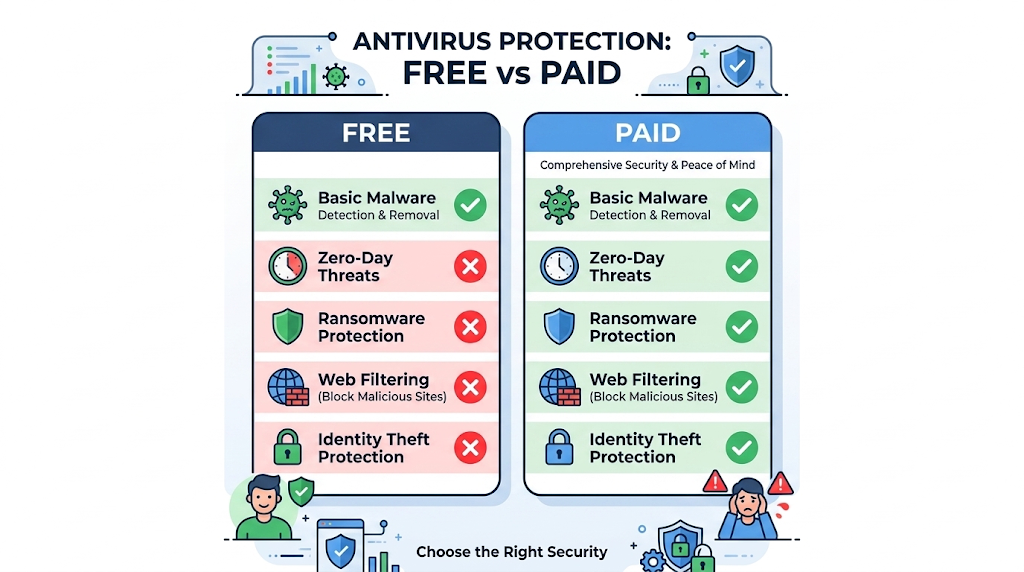
But here’s what free antivirus does NOT protect you against in 2026:
Zero-day exploits. These are attacks targeting vulnerabilities that the software vendor hasn’t patched yet. Free antivirus relies heavily on signature-based detection — it recognizes malware it’s seen before. Zero-day attacks are, by definition, new and unrecognized. Paid solutions increasingly use behavioral analysis and machine learning to flag suspicious activity even when no signature exists. Free tiers typically lack these advanced detection layers.
Ransomware-specific protection. While free antivirus may catch some ransomware variants after they’re identified, most free tiers don’t include dedicated ransomware shields that monitor for encryption behavior in real time. Paid solutions like Bitdefender Total Security and ESET Internet Security include ransomware rollback features that can restore encrypted files even if the attack succeeds. Free versions do not.
Web and email threat filtering. Paid antivirus suites include real-time scanning of web traffic and email attachments before they reach your browser or inbox. They block malicious websites, phishing pages, and drive-by downloads at the network level. Free versions typically scan files after they’ve already landed on your device — which is one step too late for many modern attacks.
Identity theft and dark web monitoring. Premium security suites in 2026 increasingly bundle identity protection features: monitoring your Social Security number, email, and financial accounts for signs of compromise on the dark web. Free antivirus offers none of this.
Advanced firewall and network protection. While Windows Defender includes a basic firewall, paid suites offer two-way firewall management, Wi-Fi intrusion detection, and network vulnerability scanning that identifies insecure devices on your home network.
The bottom line on free antivirus: It’s a solid baseline. If you’re a casual user who browses mainstream websites, keeps your software updated, and practices good email hygiene, Windows Defender alone may be sufficient. But if you handle sensitive financial data, run a small business, have children using your devices, or frequently download files from unfamiliar sources, the gaps in free protection represent real risk. A paid suite typically costs $30–$60/year — less than the deductible on most identity theft insurance policies.
Myth 1: “Macs Don’t Get Viruses”
This is the oldest and most persistent myth in consumer cybersecurity, and it was never fully true. In 2026, it’s actively dangerous.
The myth originated in the early 2000s when macOS had a tiny market share and cybercriminals focused their efforts on Windows because that’s where the targets were. The logic was simple: why write malware for 5% of users when you can target 90%?
That math has changed. Apple’s Mac market share in the U.S. has climbed to roughly 30% of the desktop/laptop market in 2026, and Mac users tend to have higher incomes — making them more valuable targets for financial malware and ransomware.
What’s actually happening to Macs in 2026:
Adware and potentially unwanted programs (PUPs) are the most common Mac threats. These bundle themselves with free software downloads and flood your browser with pop-ups, redirect your searches, and track your browsing activity. macOS’s built-in XProtect catches some of these, but new variants appear faster than Apple’s signature updates.
Info-stealers targeting macOS have surged. Malware families like Atomic Stealer (AMOS) and Realst are specifically designed to extract passwords, cryptocurrency wallets, browser cookies, and Keychain data from Macs. They’re distributed through fake software installers and pirated application downloads.
Ransomware for macOS exists and is growing. While still less common than Windows ransomware, variants like EvilQuest and ThiefQuest have demonstrated that Mac encryption attacks are viable and profitable.
The fix: Don’t rely solely on macOS’s built-in protections. Keep XProtect and Gatekeeper active, but supplement them with a reputable macOS security tool like Malwarebytes for Mac or CleanMyMac’s security module if you download software from outside the App Store. More importantly, apply the same cautious browsing and download habits you’d use on Windows.
Myth 2: “I’m Not Important Enough to Be Targeted”
“I’m not a celebrity. I don’t work for the government. I don’t have millions in crypto. Why would anyone hack me?”
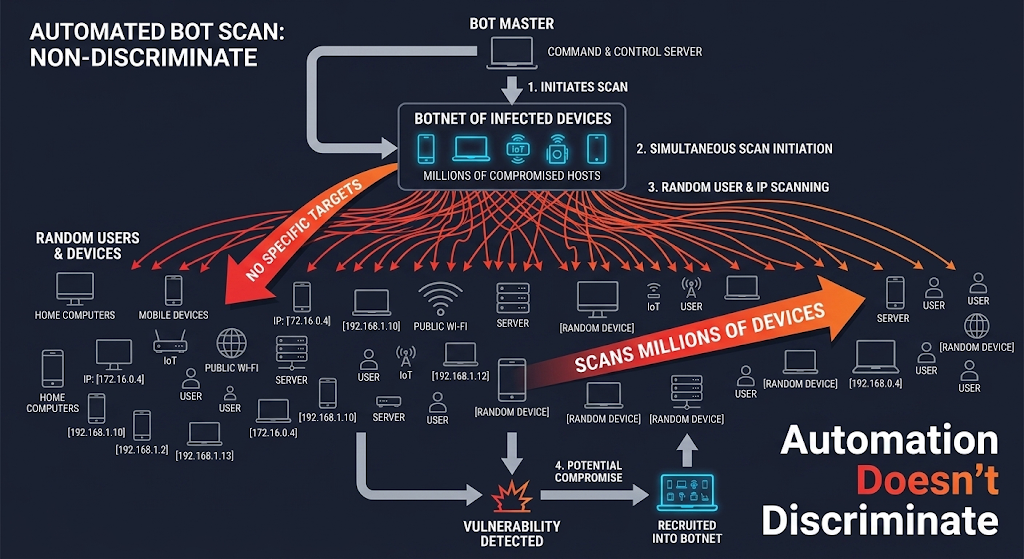
Because cybercrime in 2026 is largely automated. Attackers don’t sit at keyboards picking individual targets. They deploy bots that scan millions of IP addresses, email addresses, and devices simultaneously, looking for any vulnerability they can exploit. You don’t need to be important — you just need to be vulnerable.
How automated attacks actually work:
Credential stuffing bots try billions of stolen username/password combinations across thousands of websites every day. They don’t care who you are. If your email and password from a 2023 data breach work on your bank’s website, the bot logs in and drains your account. The entire process takes seconds and requires zero human involvement.
Ransomware gangs use automated scanning tools to find unpatched systems and open network ports. When they find one, they deploy their payload. Small businesses and individuals are actually preferred targets because they’re less likely to have robust defenses and more likely to pay the ransom quickly.
Phishing campaigns are sent to millions of addresses at once. The attackers don’t know who you are when they send the email. They only need a 0.1% click-through rate to make the campaign profitable.
The reality: Your value to a cybercriminal isn’t your identity — it’s your data, your computing power, and your willingness to pay. Your email account alone is worth compromising because it’s the password reset gateway to every other account you own. Your computer’s processing power can be hijacked for cryptocurrency mining or botnet operations. Your credit card number can be sold on the dark web for $5–$15.
The fix: Stop thinking of yourself as a target and start thinking of yourself as a data point in an automated attack. The defenses that protect high-value targets — unique passwords, MFA, software updates, cautious email habits — are the same defenses that protect you. Automation doesn’t discriminate.
Myth 3: “Incognito Mode Keeps Me Safe and Private”
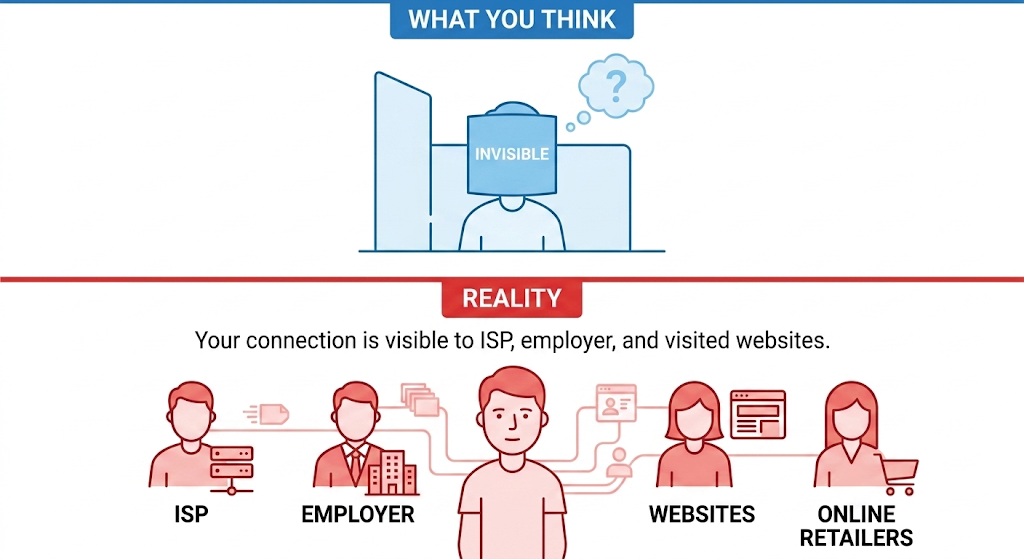
This is one of the most misunderstood features in all of consumer technology. Millions of people open an Incognito or Private Browsing window and assume they’re now invisible online. They are not.
What Incognito mode actually does:
Prevents your browser from saving your browsing history locally
Deletes cookies and site data when you close the window
Doesn’t save form entries or passwords you type during the session
What Incognito mode does NOT do:
Hide your browsing activity from your internet service provider (ISP). Your ISP can still see every website you visit.
Hide your activity from your employer if you’re on a work network or using a work device. Network-level monitoring sees all traffic regardless of browser mode.
Prevent websites from tracking you during the session. Websites can still see your IP address, device fingerprint, and browsing behavior while the Incognito window is open.
Protect you from malware. Downloading a malicious file in Incognito mode is exactly as dangerous as downloading it in a normal window.
Encrypt your connection. That’s what HTTPS and VPNs do, not Incognito mode.
The danger of this myth: People use Incognito mode for sensitive activities — online banking, medical research, accessing personal accounts on shared computers — believing they’re protected. They’re not. The only thing Incognito protects against is someone physically looking at your browser history after you’ve closed the window.
The fix: Use Incognito mode for what it’s designed for — preventing local history storage on shared devices. For actual privacy and security, use a reputable VPN to encrypt your traffic, ensure you’re on HTTPS websites, and avoid conducting sensitive activities on networks you don’t control.
Myth 4: “If My Antivirus Says I’m Clean, I’m Safe”
A green checkmark from your antivirus scan is reassuring. It’s also incomplete.
Antivirus scans check your files against a database of known malware signatures. When the scan reports “no threats found,” it means your files don’t match any malware the antivirus company has identified and cataloged. It does not mean your system is free of all threats.
What a clean scan misses:
Fileless malware operates entirely in your computer’s memory (RAM) without writing any files to your hard drive. Traditional antivirus scans check files on disk. If the malware exists only in memory, there’s nothing for the scanner to find. Fileless attacks often use legitimate system tools like PowerShell or Windows Management Instrumentation (WMI) to execute malicious commands, making them nearly invisible to signature-based detection.
Living-off-the-land (LotL) attacks use your operating system’s own built-in tools against you. Instead of installing external malware, attackers hijack legitimate programs that your antivirus trusts. Since the programs themselves are genuine Microsoft or Apple utilities, the antivirus doesn’t flag them.
Supply chain compromises occur when attackers infiltrate a legitimate software vendor and insert malicious code into a trusted update. Your antivirus sees the update as coming from a verified, signed source and allows it through. The SolarWinds attack of 2020 was a supply chain compromise that bypassed every major antivirus product on the market.
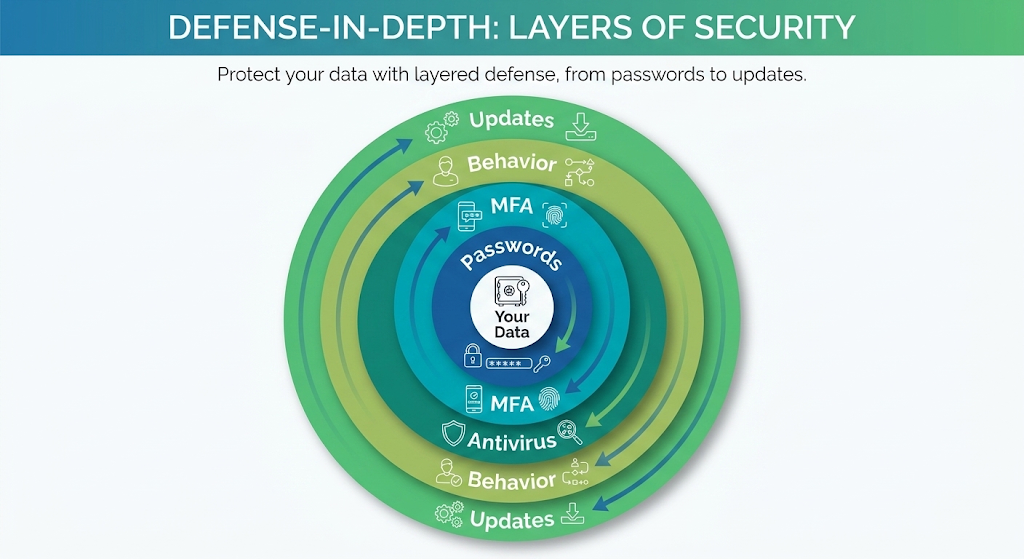
The fix: Treat your antivirus as one layer of defense, not the only layer. Combine it with the behavioral practices covered in our Cybersecurity for Beginners guide — cautious email habits, regular software updates, and MFA. If you want stronger detection, consider a paid security suite that includes behavioral analysis and endpoint detection and response (EDR) capabilities, which monitor for suspicious activity patterns rather than relying solely on file signatures.
Myth 5: “I Only Visit Legitimate Websites, So I Can’t Get Infected”
This myth assumes that malware only lives on shady websites — pirated software repositories, adult sites, and suspicious download portals. While those sites are indeed high-risk, they’re not the only source of infection.
Legitimate websites get compromised regularly. In 2026, attackers routinely inject malicious code into the advertising networks that serve ads on mainstream news sites, blogs, and e-commerce platforms. This technique, called malvertising, means you can be infected simply by visiting a perfectly legitimate website that displays a compromised ad. You don’t need to click anything — some malvertising exploits trigger automatically when the ad loads in your browser (drive-by downloads).
Watering hole attacks target specific groups by compromising the legitimate websites those groups are known to visit. If an attacker knows that employees of a particular industry frequent a specific trade publication’s website, they’ll compromise that site and serve malware to visitors. The website itself is trustworthy. The infection is invisible.
Browser extensions from official web stores can be malicious or become malicious after acquisition. A popular extension with millions of users can be sold to a new developer who quietly adds data-harvesting code in an update. The extension remains listed in the official Chrome Web Store or Firefox Add-ons directory, lending it an appearance of legitimacy.
The fix: Don’t judge safety by a website’s reputation alone. Keep your browser and all plugins updated to patch the vulnerabilities that drive-by downloads exploit. Use an ad blocker (like uBlock Origin) to reduce malvertising exposure. Audit your browser extensions quarterly and remove any you don’t actively use. And maintain active antivirus protection even if you only visit mainstream sites.
Myth 6: “Cybersecurity Is an IT Department Problem, Not Mine”
This myth persists in workplaces of all sizes. Employees assume that the company’s IT team handles security, so individual behavior doesn’t matter. In 2026, this mindset is the single biggest vulnerability in most organizations.
The data tells a clear story: The vast majority of successful cyberattacks against businesses involve human error as a contributing factor. An employee clicks a phishing link. Someone reuses a weak password. A team member shares a sensitive file with the wrong recipient. The IT department’s firewalls, endpoint protection, and network monitoring are bypassed not by technical sophistication but by a single human mistake.
Why this matters even if you’re not in IT:
Your credentials are a gateway. If an attacker compromises your work email through a phishing attack, they can use your legitimate access to move laterally through the company’s network, escalate privileges, and deploy ransomware. The IT department’s defenses are designed to stop external attacks. When the threat comes from inside — through your compromised account — many of those defenses are bypassed.
Your devices are endpoints. Every laptop, phone, and tablet connected to your company’s network is a potential entry point. If your personal device is infected because you skipped updates or downloaded a malicious app, the malware can spread to the corporate network the next time you connect to the company VPN.
The fix: Treat cybersecurity as a shared responsibility. Follow your company’s security policies even when they feel inconvenient. Report suspicious emails to your IT team instead of ignoring them. Complete security awareness training seriously rather than clicking through it. And understand that your individual actions directly affect the security of every colleague and customer your organization serves.
Myth 7: “I Have Nothing to Hide, So Privacy Doesn’t Matter”
“I’m not doing anything illegal. I don’t care if companies track my browsing or if my data is collected. I have nothing to hide.”
This myth conflates privacy with secrecy, and it’s the reason many people voluntarily surrender protections that they’ll desperately need later.
Privacy isn’t about hiding wrongdoing. It’s about controlling how your personal information is used. You may not care that an ad network knows you searched for running shoes. You should care when a data breach exposes your Social Security number, your children’s names, your home address, and your medical history to criminal marketplaces on the dark web.
The consequences of the “nothing to hide” mindset in 2026:
Identity theft doesn’t require you to do anything wrong. It requires your data to be available. Every account you create with a weak password, every form you fill out on an unsecured website, and every data breach involving a service you use adds to the pool of information criminals can assemble to impersonate you.
Financial fraud exploits the data you’ve already shared. If your email, phone number, and date of birth are publicly available through social media and data broker sites, an attacker can use that information to reset your bank passwords, open credit cards in your name, or file fraudulent tax returns.
Social engineering attacks weaponize your public information. The more data you’ve made available — willingly or not — the more convincing a phishing email or deepfake phone call becomes. An attacker who knows your mother’s name, your employer, and your recent vacation destination can craft a message that’s nearly impossible to distinguish from a legitimate communication.
The fix: Shift your mental model from “I have nothing to hide” to “I have things worth protecting.” Your financial accounts, your medical records, your family’s safety, and your professional reputation all depend on controlling who has access to your personal information. Apply the same discretion to your digital life that you apply to your physical one.
Quick-Reference: Myth vs. Reality
Myth
Reality
Free antivirus is enough
It covers known malware but misses zero-days, ransomware behavior, and web threats
Macs don’t get viruses
Mac-targeted malware is growing rapidly, especially info-stealers and adware
I’m not a target
Automated attacks don’t care who you are — they target vulnerabilities, not identities
Incognito mode is safe
It only hides local browsing history, not your activity from ISPs, employers, or websites
Malvertising and watering hole attacks infect visitors through compromised trusted sites
Cybersecurity is IT’s job
Human error causes most breaches — your individual behavior is the weakest link
Frequently Asked Questions
What is the best free antivirus in 2026?
Windows Defender (Microsoft Defender Antivirus) is the best free option for most users. It’s built into Windows 11, requires no installation, updates automatically, and scores competitively with paid solutions in independent AV-TEST evaluations for known malware detection. For macOS, the built-in XProtect and Gatekeeper provide baseline protection, supplemented well by Malwarebytes Free for on-demand scanning.
When should I upgrade to paid antivirus?
Upgrade if you handle sensitive financial or business data, if your household includes children or less tech-savvy users, if you frequently download files from unfamiliar sources, or if you’ve experienced a security incident in the past. Paid suites add ransomware protection, behavioral analysis, web filtering, and identity monitoring that free versions lack. Expect to pay $30–$60/year for a reputable single-device license.
Can antivirus software slow down my computer?
Modern antivirus solutions have minimal impact on system performance. Independent testing from AV-Comparatives shows that most major engines (Bitdefender, ESET, Kaspersky, Windows Defender) add less than a 5% performance overhead during typical use. If you notice significant slowdowns, the issue is more likely caused by outdated hardware, insufficient RAM, or too many startup programs than by your antivirus software.
Do I need antivirus on my phone?
For Android, yes — especially if you install apps from outside the Google Play Store. Android’s open ecosystem makes it more susceptible to malicious apps. Google Play Protect provides baseline scanning, but a dedicated mobile security app adds phishing protection and app behavior monitoring. For iPhones, traditional antivirus is less necessary due to iOS’s sandboxed app architecture, but you should still be cautious about phishing links and malicious configuration profiles.
How do I know if my current antivirus is actually working?
Run a test using the EICAR test file — a harmless string of code that all legitimate antivirus programs are designed to detect. Download it from eicar.org and see if your antivirus flags it. If it does, your real-time protection is active. If it doesn’t, your antivirus may be misconfigured or disabled. Additionally, check your antivirus dashboard to confirm that real-time scanning and automatic updates are both enabled.
The Bottom Line
Free antivirus is a starting point, not a complete solution. It handles the threats that were common a decade ago but leaves significant gaps against the attack methods that dominate in 2026. The seven myths in this article all share a common thread: they create a false sense of security that leads to complacency.
The most effective cybersecurity strategy combines technical tools (antivirus, MFA, password managers, VPNs) with informed behavior (skeptical email habits, regular updates, cautious browsing). Neither alone is sufficient. Together, they make you a significantly harder target than the vast majority of internet users.