How to Choose the Right AI Aggregator in 2026: A Step-by-Step Buyer’s Guide
You've decided to try an AI aggregator. Smart move. Your current setup- five separate AI subscriptions, six browser tabs, three forgotten free trials still charging your card- isn't sustainable. But now you're staring at a new problem. There's Poe, OpenRouter, TypingMind, ChatHub, AWS Bedrock, LiteLLM, Portkey, and a dozen others you've never heard of. Each one claims to be the best. Each pricing page uses different terminology. One charges per month, another charges per token, and a third wants a one-time payment plus your own API keys. You came here to simplify your AI life, and somehow you've ended up with a more complicated decision than the one you started with. This guide fixes that. It's not a list of platforms with affiliate links hoping you click the most expensive option. It's a practical, step-by-step framework that helps you figure out exactly what you need, what to watch out for, and how to make a confident choice in under a week. By the end of this article, you'll know which AI aggregator fits your specific situation — and more importantly, which ones to avoid. Before You Compare Platforms, Answer These 5 Questions About Yourself Most people skip this step and jump straight to comparing features. That's a mistake. The right aggregator for a freelance writer is completely wrong for a software developer, and neither is right for a 50-person marketing team. You need to know your own profile before you evaluate any platform. 1. How Many AI Models Do You …
You’ve decided to try an AI aggregator. Smart move. Your current setup- five separate AI subscriptions, six browser tabs, three forgotten free trials still charging your card- isn’t sustainable.
But now you’re staring at a new problem. There’s Poe, OpenRouter, TypingMind, ChatHub, AWS Bedrock, LiteLLM, Portkey, and a dozen others you’ve never heard of. Each one claims to be the best. Each pricing page uses different terminology. One charges per month, another charges per token, and a third wants a one-time payment plus your own API keys.
You came here to simplify your AI life, and somehow you’ve ended up with a more complicated decision than the one you started with.
This guide fixes that. It’s not a list of platforms with affiliate links hoping you click the most expensive option. It’s a practical, step-by-step framework that helps you figure out exactly what you need, what to watch out for, and how to make a confident choice in under a week.
By the end of this article, you’ll know which AI aggregator fits your specific situation — and more importantly, which ones to avoid.
Before You Compare Platforms, Answer These 5 Questions About Yourself
Most people skip this step and jump straight to comparing features. That’s a mistake. The right aggregator for a freelance writer is completely wrong for a software developer, and neither is right for a 50-person marketing team. You need to know your own profile before you evaluate any platform.
1. How Many AI Models Do You Actually Use Daily?
Be honest. Not how many you’ve signed up for, but how many you actively open and use on a typical workday.
If the answer is one or two (say, ChatGPT and nothing else), you probably don’t need an aggregator yet. A single direct subscription is simpler and often cheaper when there’s nothing to consolidate.
We broke down the exact cost math in our AI Aggregator vs Individual AI Tools comparison, and the numbers are clear: aggregation saves money when you’re combining three or more subscriptions.
If you’re regularly switching between three or more AI models- ChatGPT for writing, Claude for research, Perplexity for fact-checking, Midjourney for images- then consolidation will save you real money and real time. That’s when an aggregator starts making sense.
2. Are You a Chat User, a Developer, or a Team Admin?
Your user type determines which entire category of aggregator you should be looking at. These categories barely overlap, so getting this wrong means wasting time evaluating platforms that were never built for you.
Chat users are writers, marketers, researchers, students, and business owners who interact with AI through a conversational interface. You type a prompt, you get a response. You need a clean chat window with model switching.
Developers are building AI features into software products. You don’t need a chat window — you need a reliable API endpoint that lets you route requests to different models from your codebase.
Team admins are managing AI access for a group of employees. You need centralized billing, user permissions, usage tracking, and compliance controls. The chat interface matters less than the admin dashboard.
Identify which bucket you fall into right now. We’ll map each bucket to specific platforms later in this guide.
3. Which Specific AI Models Are Non-Negotiable for You?
Before you evaluate any aggregator, write down the specific models you can’t live without. Not vague categories like “a good writing AI” — actual model names.
For example: GPT-4o, Claude 4 (Sonnet or Opus), Gemini 2.5 Pro, Llama 4, Mistral Large. These are the models you’ll check for on every aggregator’s platform page.
This matters because not every aggregator supports every model. Some platforms have broad coverage of text models but no image generation. Others support 500+ models through API but may lag in adding the newest releases. If Claude 4 Opus is critical to your legal research workflow and a particular aggregator only offers Claude 4 Sonnet, that aggregator won’t work for you regardless of how cheap it is.
4. Do You Need Specialized AI Tools Beyond Text Generation?
Most AI aggregators excel at consolidating text-based language models. If your workflow is primarily writing, research, brainstorming, and coding, you’re well-covered.
But if you depend on specialized AI tools — Midjourney for image generation, ElevenLabs for voice cloning, Runway for video editing, Suno for music creation — you need to know upfront that most chat aggregators don’t include these. Their APIs are often proprietary, their compute costs are too high to bundle, or their licensing agreements prevent third-party redistribution.
This doesn’t mean you shouldn’t use an aggregator. It means you should plan for a hybrid setup: aggregator for text models, individual subscriptions for specialized tools. We covered this approach in detail in our AI Aggregator vs Individual AI Tools guide.
5. What Is Your Actual Monthly AI Budget?
Look at your bank statements from the last three months. How much are you actually spending on AI tools right now? Not what you think you should be spending — what’s actually leaving your account.
This number is your baseline. Any aggregator you evaluate needs to come in below this number while delivering equivalent or better functionality. If you’re currently spending $40/month on two tools and an aggregator costs $20/month but forces you to keep one $30 standalone subscription, your new total is $50 — you’ve actually made things more expensive.
Do the math before you fall in love with a low headline price.
Step-by-Step Process: How to Evaluate and Select Your AI Aggregator in Under a Week
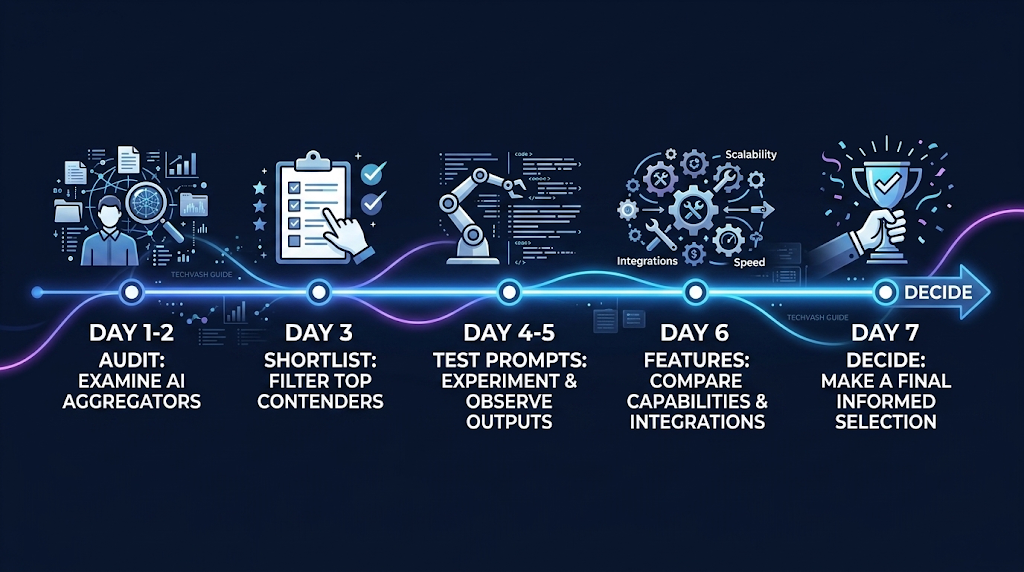
Here’s a practical timeline you can follow starting today. It’s designed to take about an hour per day for seven days. By the end of the week, you’ll have a clear winner.
Day 1–2: Audit Your Current AI Stack
Open your bank statements and list every AI tool you’re currently paying for. For each tool, note three things:
The monthly cost
The specific model or feature you use most
How many days per week you actually open it
This audit often reveals surprises. You may discover you’re paying $20/month for a tool you haven’t opened in three weeks. That subscription should be canceled regardless of whether you switch to an aggregator.
Your audit gives you two numbers: your current total monthly spend and your list of non-negotiable models and features. These become your evaluation benchmarks.
Day 3: Shortlist 2–3 Aggregators Based on Your User Type
Don’t evaluate every aggregator on the market. There are dozens, and most of them aren’t built for your use case. Narrow your list based on the user type you identified earlier:
Solo creators, freelancers, students: Poe, TypingMind, ChatHub
Developers and technical teams: OpenRouter, LiteLLM, Portkey
Small businesses (2–20 people): Poe + a workflow tool like Zapier AI or Make.com
Enterprises (50+ seats): AWS Bedrock, Microsoft Copilot Studio, Google Vertex AI
Pick 2–3 from your category. Don’t mix categories — comparing Poe to AWS Bedrock is like comparing a bicycle to a cargo ship. They solve different problems.
Day 4–5: Run the Same 10 Prompts Across Each Shortlisted Aggregator
This is the most important step. Create a list of 10 prompts that represent your actual daily work. Include a mix of task types:
A long document summarization (paste a 2,000-word article and ask for key takeaways)
A creative writing task (draft a product description or social media caption)
A reasoning or analysis question (compare two business strategies)
A code-related request (debug a function or explain a concept)
A data interpretation task (describe a chart or table)
An edge case (a prompt in a language other than English, or a request that requires web browsing)
Run each prompt on every aggregator you’re testing, using the same model (e.g., GPT-4o) on each platform. Compare the outputs for quality, speed, formatting, and accuracy. You’ll often find that the same model performs slightly differently through different aggregators due to how the API calls are configured.
Day 6: Test Your Must-Have Native Features
Go back to the list of 3–5 native features you identified in Question 3. Test each one on your shortlisted aggregators:
Upload a PDF and ask the AI to analyze it
Try generating an image if that’s part of your workflow
Check if conversation memory persists across sessions
Test file export and sharing capabilities
Try any integrations you need (Slack, Notion, etc.)
This step eliminates platforms that look great on paper but can’t handle your specific workflow in practice.
Day 7: Calculate the True Cost and Make Your Decision
Using your actual usage patterns from the Day 1 audit, calculate what each aggregator would cost you per month. Be thorough:
Base subscription or usage fees
Estimated overage charges if you exceed usage caps
Cost of any standalone subscriptions you’ll still need for specialized tools
Any setup or onboarding costs (mostly relevant for enterprise platforms)
Choose the option with the best feature-to-cost ratio, not just the lowest price. A $10/month aggregator that’s missing your most important native feature will cost you more in lost productivity than a $20/month aggregator that covers everything you need.
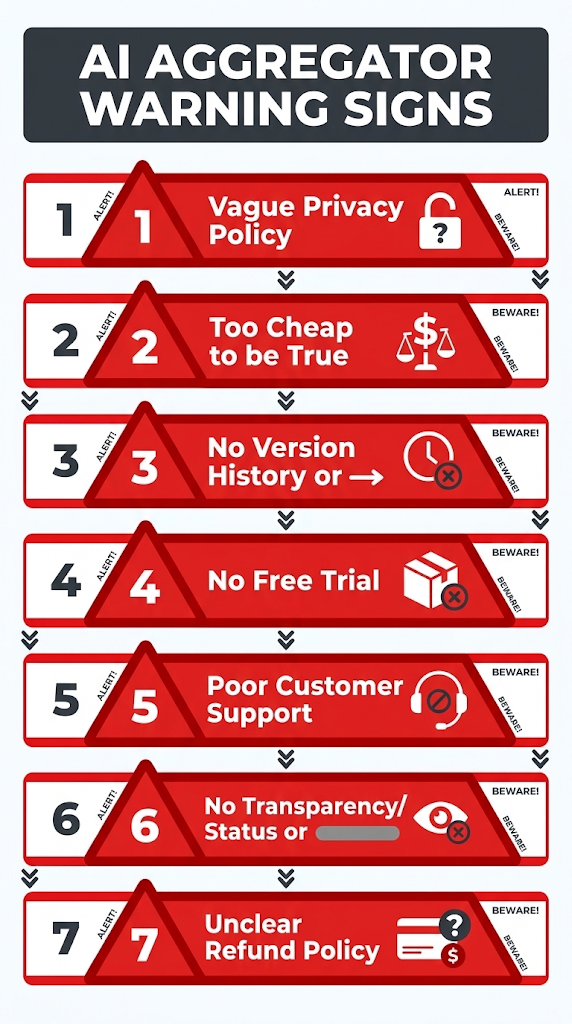
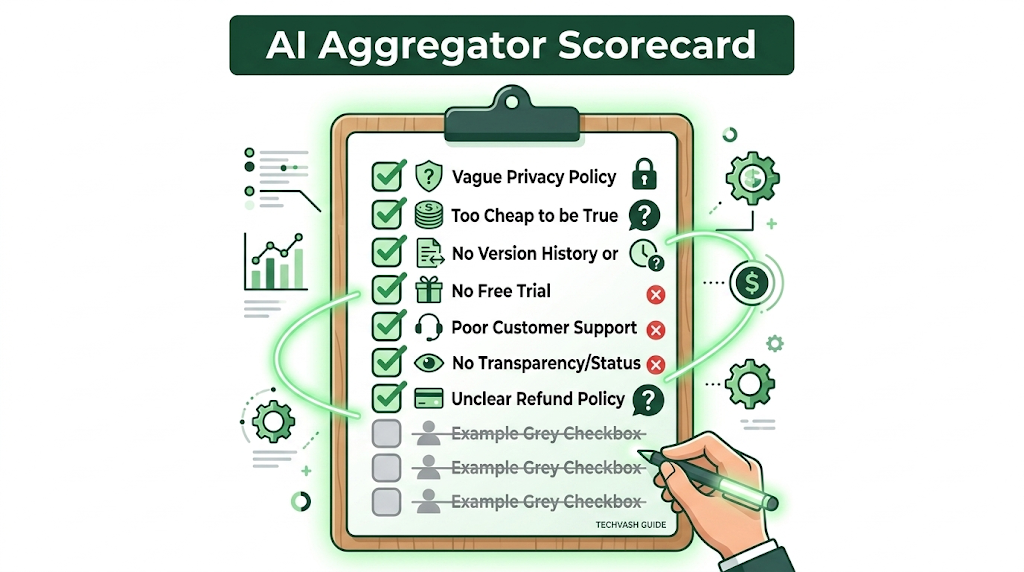
7 Red Flags That Should Make You Walk Away From an AI Aggregator
Not every aggregator is trustworthy. The AI space is flooded with new entrants, and some of them cut corners in ways that will cost you later. If you see any of these red flags during your evaluation, cross that platform off your list.
Red Flag 1: Vague or Missing Privacy Policy
If you can’t find a clear statement about data handling within two clicks of the homepage, the aggregator likely hasn’t invested in compliance. A privacy policy that says “we may use your data to improve our services” without specifying what “data” means or what “improve” entails is a warning sign. Walk away.
Red Flag 2: “Unlimited Everything” at Suspiciously Low Prices
If an aggregator promises unlimited GPT-4o and Claude 4 access for $5/month, the math doesn’t work. OpenAI and Anthropic charge significant per-token fees for these models. An aggregator offering unlimited access at a fraction of the cost is either throttling you heavily behind the scenes, serving you older model versions while labeling them as current, or subsidizing the service by training on your data. None of those outcomes are in your interest.
Red Flag 3: No Model Version Transparency
Some aggregators list “GPT-4” or “Claude” without specifying which exact version you’re getting. Are you talking to GPT-4o or the older GPT-4 Turbo? Are you getting Claude 4 Opus or Claude 4 Sonnet? These are very different models with very different capabilities and costs. If the aggregator won’t tell you exactly which model version is responding to your prompts, you can’t trust the quality of the output.
Red Flag 4: No Free Tier or Trial Period
Every reputable AI aggregator in 2026 offers at least a limited free tier or a trial period. If a platform requires payment before you can send a single message, you have no way to verify model quality, response speed, or feature parity before committing. This is especially risky for new or unknown platforms.
Red Flag 5: Poor or Non-Existent Customer Support
Check whether the aggregator offers a support email, live chat, help center, or active community forum. If the only support channel is a contact form with a stated 72-hour response time, or worse, no support channel at all, you’ll be stranded when something breaks. And something will break. API connections drop, models get updated, billing glitches happen. You need a responsive support team.
Red Flag 6: No Status Page or Incident History
Every reliable platform publishes real-time uptime data on a public status page. If the aggregator has no status page, they’re either hiding outages from their users or they haven’t reached the operational maturity you need for business-critical workflows.
Red Flag 7: Aggressive Long-Term Contracts With No Refund
Annual plans that offer a meaningful discount (like Poe’s $199.99/year vs. $19.99/month) are perfectly reasonable. But if an aggregator requires a 12-month commitment with no refund policy, no monthly option, and no cancellation clause, that’s a lock-in trap. The AI market changes too fast for you to commit to a full year with no exit ramp.
Quick-Reference: Which AI Aggregator Fits Which User in 2026?
If you want the short version, here’s the decision table. Find your user type, check the key strength and limitation, and decide whether the trade-off works for you.
User Type
Best Aggregator
Pricing Model
Key Strength
Key Limitation
Solo creator / freelancer
Poe
$19.99/mo (points-based)
Broadest model variety in one chat interface
Points cap on premium models like GPT-4o and Claude 4
Privacy-conscious individual
TypingMind
$39–$99 one-time + your API costs
Your keys, your data, no middleman server
Requires managing your own API keys and billing
Small business (2–20 people)
Poe + Zapier AI
~$20 + $20–$50/mo
Chat access plus workflow automation
No built-in governance, SSO, or admin controls
Software developer
OpenRouter
Pay-per-token (pass-through rates)
500+ models across 80+ providers, single API endpoint
No chat interface, developer-only, small credit purchase fee (~5–5.5%)
Enterprise (50+ seats)
AWS Bedrock
Negotiated volume pricing
Compliance certifications, SSO, audit logs, data residency
Complex setup, requires AWS account and technical team
Student / casual user
Poe Free or Gemini Free
$0
Zero cost, decent model access for basic tasks
Heavy usage limits, restricted access to premium models
How to read this table: Find your row, then verify that the “Key Strength” matches your top priority and the “Key Limitation” is something you can comfortably live with. No aggregator is perfect for everyone. The goal is the best fit for your specific situation, not the objectively best product.
Common Mistakes People Make When Choosing an AI Aggregator
I’ve watched hundreds of users go through this process, and the same mistakes come up over and over. Avoid these five pitfalls and you’ll make a better decision than 90% of people.
Mistake 1: Choosing Based on Model Count Alone
An aggregator advertising “500+ AI models” sounds impressive until you realize that 450 of them are obscure research models you’ll never use. What matters is whether the 5–10 models you actually care about are available, performant, and accessible within your usage limits. Quality of access to the models you need beats quantity of models you don’t.
Mistake 2: Ignoring the Points or Token Math
Many users sign up for a $20/month plan assuming they’re getting unlimited access to every model, then discover halfway through the month that they’ve burned through their entire points allocation on GPT-4o messages. Always calculate the cost-per-message for your most-used model before committing. If you send 200 GPT-4o messages per month and each one costs 50 points, you need 10,000 points monthly. Check whether your plan provides that.
Mistake 3: Not Testing Before Canceling Existing Subscriptions
This is the biggest mistake, and it’s the one that causes the most regret. Do not cancel your current AI subscriptions the moment you sign up for an aggregator. Run both systems in parallel for at least two weeks. Use the aggregator for your daily work and keep your individual tools as a backup. Only cancel the individual subscriptions once you’ve confirmed that the aggregator handles every task you throw at it with acceptable quality and speed.
Mistake 4: Overlooking Team Adoption Friction
If you’re choosing an aggregator for a team, the technically superior platform is worthless if your team refuses to use it. The aggregator with the most models and the best API is irrelevant if your least technical team member can’t figure out the interface within 10 minutes. Choose the platform with the lowest learning curve for your team’s skill level, not the one with the most impressive feature list.
Mistake 5: Forgetting About Future Scalability
Your AI usage will grow. The aggregator that works perfectly for your 5-person team today may not handle 50 employees next year. Before committing, ask about team plans, volume pricing tiers, and enterprise features. Even if you don’t need them now, knowing they exist gives you confidence that you won’t outgrow the platform in six months.
Frequently Asked Questions About Choosing an AI Aggregator
What is the best AI aggregator for beginners in 2026?
Poe is the easiest starting point for beginners. It has a clean, intuitive chat interface, a free tier you can test without entering a credit card, and a straightforward $19.99/month paid plan that gives you access to GPT-4o, Claude 4, Gemini 2.5, and dozens of other models. No API keys to manage, no technical setup, no learning curve. If you’ve used ChatGPT before, you already know how to use Poe.
How do I know if an AI aggregator is trustworthy?
Check three things. First, read the privacy policy and look for an explicit statement that they do not store your prompts or use them for model training. Second, verify that they publish a public uptime status page with historical incident data. Third, confirm that the company has verifiable information — a real team, a physical address, and identifiable funding or revenue. Avoid aggregators with anonymous ownership, no legal entity listed, and vague terms of service.
Can I switch AI aggregators later if I don’t like the one I chose?
Yes, but the ease of switching depends on the platform. Aggregators that let you export your conversation history in standard formats (JSON, CSV, Markdown) and use open API standards make switching relatively painless. Platforms that store your workflows in proprietary formats or don’t offer data export make it harder. Always check the export and data deletion options before committing to a long-term plan.
Should I choose a subscription aggregator or a bring-your-own-keys aggregator?
Choose a subscription aggregator like Poe if you want simplicity, one login, one bill, no technical setup. Choose a bring-your-own-keys aggregator like TypingMind if data privacy is your top priority and you’re comfortable managing your own API accounts with OpenAI, Anthropic, and Google. Subscription is easier. BYOK is more private. Both are legitimate approaches depending on your priorities.
Is it better to use one aggregator or multiple?
For most users, one aggregator plus 1–2 specialized standalone tools is the optimal setup. Using multiple aggregators defeats the entire purpose of consolidation and recreates the exact fragmentation problem you were trying to solve. Pick the aggregator that covers the most models you need, then keep individual subscriptions only for specialized tools the aggregator can’t replicate (like Midjourney for images or ElevenLabs for voice).
How often should I re-evaluate my AI aggregator choice?
Every six months is a good cadence. The AI aggregator market moves fast — new platforms launch, pricing structures change, model availability shifts, and features get added or removed. A quick 30-minute review twice a year ensures you’re still getting the best value. Set a calendar reminder for January and July.
Do AI aggregators offer refunds if I’m not satisfied?
It varies by platform. Poe offers refunds within a limited window through app store policies if you subscribed via iOS or Android. TypingMind’s one-time purchase is generally non-refundable after the license key is delivered. Enterprise aggregators like AWS Bedrock operate on pay-as-you-go pricing with no long-term commitment, so there’s nothing to refund — you simply stop using the service. Always check the specific refund policy on the aggregator’s website before paying.
Final Checklist: Your AI Aggregator Selection Scorecard
Use this checklist during your evaluation week. Check off each item as you complete it. If you can check all 10 boxes for a specific aggregator, you’ve found your match.
☐ I’ve listed every AI tool I currently pay for and calculated my total monthly spend
☐ I’ve identified my 3–5 must-have models and native features
☐ I’ve shortlisted 2–3 aggregators that match my user type
☐ I’ve run the same 10 real-world prompts across each shortlisted platform
☐ I’ve verified that my must-have native features work on the aggregator
☐ I’ve read the privacy policy and confirmed how my data is handled
☐ I’ve calculated the true monthly cost including usage caps and any remaining standalone subscriptions
☐ I’ve checked the refund and cancellation policy
☐ I’ve confirmed I can export my data and switch platforms later if needed
☐ I’ve run the aggregator alongside my current tools for at least 2 weeks before canceling anything