Mechanical vs Membrane Gaming Keyboards: Which Should You Buy in 2026?
You press the W key to dodge a grenade. Your character doesn't move. You press it again — harder this time, as if mashing the plastic will make the signal travel faster. Your character finally registers the input, but the grenade has already killed you. Was it your reaction time? Your internet connection? Or the mushy rubber dome underneath your keycap that couldn't register a fast, light press because it needs you to push the key all the way down before the circuit completes? Most gamers don't think about what's happening inside their keyboard when they press a key. They think about what's happening on screen. But the mechanism under your fingertips — the physical switch that translates your finger movement into a digital signal — directly affects how fast, how reliably, and how comfortably you play. This article breaks down the two dominant keyboard technologies (and the emerging third option that's disrupting both) so you can make an informed decision based on how you actually game, not on marketing hype or forum arguments. How Each Technology Actually Works Before comparing performance, you need to understand what's physically happening when you press a key. The difference is mechanical — literally. Membrane Keyboards: The Rubber Dome Underneath every keycap on a membrane keyboard is a small rubber dome. When you press the key, the dome collapses downward until a conductive pad on its underside touches a circuit layer printed on a flexible plastic sheet. That contact completes an electrical circuit, and …
You press the W key to dodge a grenade. Your character doesn’t move. You press it again — harder this time, as if mashing the plastic will make the signal travel faster. Your character finally registers the input, but the grenade has already killed you.
Was it your reaction time? Your internet connection? Or the mushy rubber dome underneath your keycap that couldn’t register a fast, light press because it needs you to push the key all the way down before the circuit completes?
Most gamers don’t think about what’s happening inside their keyboard when they press a key. They think about what’s happening on screen. But the mechanism under your fingertips — the physical switch that translates your finger movement into a digital signal — directly affects how fast, how reliably, and how comfortably you play.
This article breaks down the two dominant keyboard technologies (and the emerging third option that’s disrupting both) so you can make an informed decision based on how you actually game, not on marketing hype or forum arguments.
How Each Technology Actually Works
Before comparing performance, you need to understand what’s physically happening when you press a key. The difference is mechanical — literally.
Membrane Keyboards: The Rubber Dome
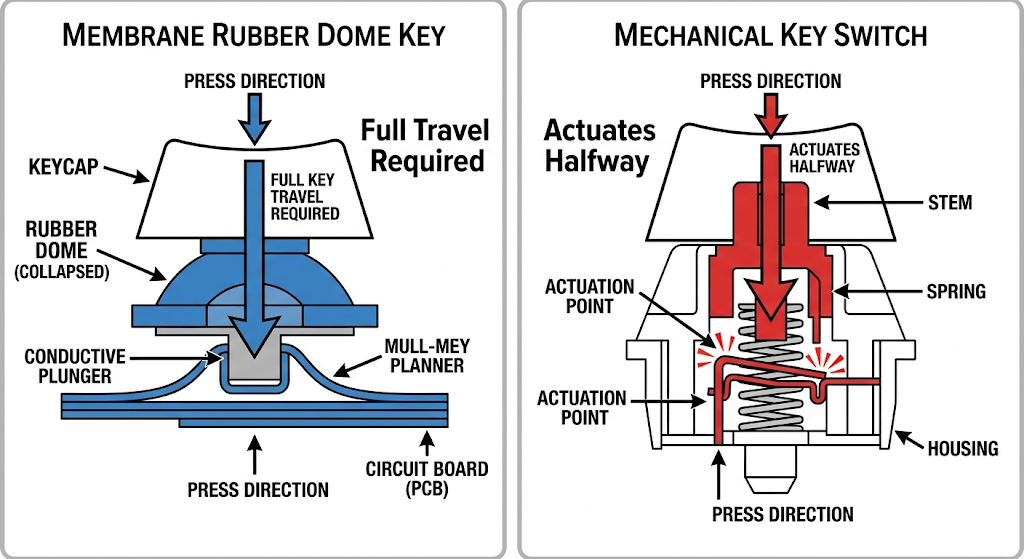
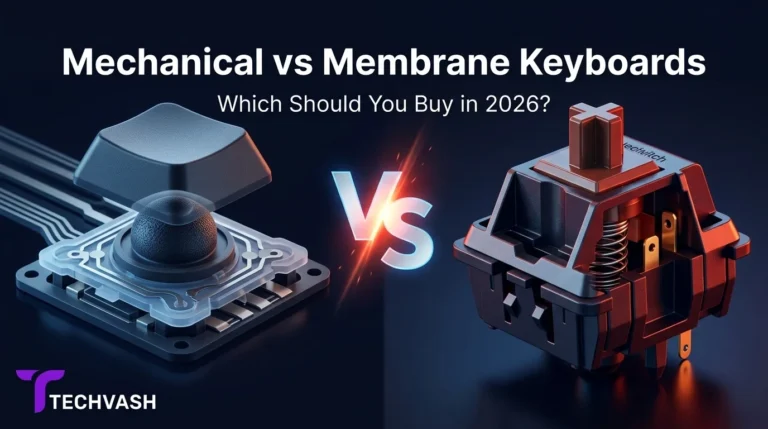
Underneath every keycap on a membrane keyboard is a small rubber dome. When you press the key, the dome collapses downward until a conductive pad on its underside touches a circuit layer printed on a flexible plastic sheet. That contact completes an electrical circuit, and the keyboard sends the keystroke signal to your computer.
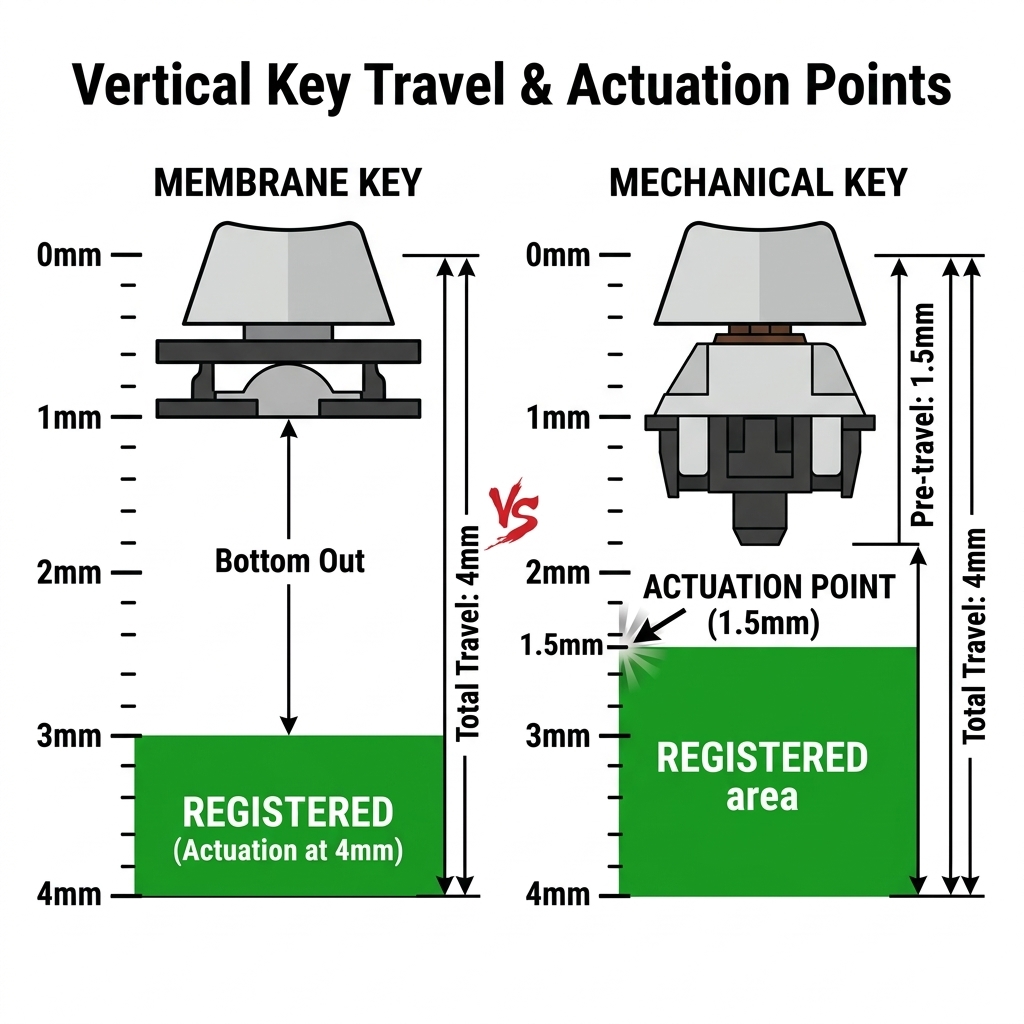
The critical detail: The circuit only completes when the dome is fully collapsed — when the key is pressed all the way to the bottom. This is called “bottoming out.” You cannot register a keystroke with a partial press. The key must travel its full distance (typically 3.5–4mm) and hit the bottom before the signal fires.
This is the same technology used in TV remote controls, microwave keypads, and the keyboard that came bundled with your first desktop computer. It’s cheap to manufacture, quiet to use, and resistant to spills because the membrane sheet covers the entire circuit board.
Mechanical Keyboards: The Individual Switch
Underneath every keycap on a mechanical keyboard is a self-contained mechanical switch — a small plastic housing containing a metal spring and metal contact leaves (or, in newer designs, an optical sensor or magnetic hall effect sensor).
When you press the key, the spring compresses and the internal mechanism reaches an actuation point — a specific depth (typically 1.0–2.0mm) at which the keystroke registers. You do not need to bottom out. The signal fires partway through the key’s travel, before the key hits the bottom.
This is the fundamental difference. Membrane keyboards require a full press. Mechanical keyboards register at a partial press. That 1–2mm difference in actuation depth translates to measurable speed advantages in gaming scenarios where milliseconds matter.
The Performance Comparison: Where It Actually Matters
Input Speed and Actuation
In a membrane keyboard, the actuation point and the bottom-out point are the same location — the very bottom of the key travel. You must press the key approximately 3.5–4mm to register a keystroke.
In a mechanical keyboard, the actuation point typically sits at 1.0–2.0mm of travel. The key registers before you’ve pressed it halfway down. This means your keystroke is registered roughly 1–2mm sooner than on a membrane keyboard, which translates to a few milliseconds of faster response per keystroke.
Does this matter in practice? For casual gaming — RPGs, strategy games, single-player adventures — the difference is imperceptible. Your reaction time (200–300ms for most humans) dwarfs the few milliseconds saved by a shorter actuation distance.
For competitive FPS and fighting games where you’re executing rapid key sequences (counter-strafing in CS2, wave-dashing in platform fighters, ability combos in MOBAs), the faster actuation compounds across hundreds of keystrokes per match. You won’t notice each individual keystroke being faster, but your overall input responsiveness will feel snappier and more precise.
N-Key Rollover and Anti-Ghosting
Anti-ghosting is the keyboard’s ability to correctly register multiple simultaneous keypresses. N-key rollover (NKRO) means the keyboard can register an unlimited number of simultaneous keypresses without dropping any.
Most membrane keyboards support 2–6 key rollover, meaning they can reliably register 2–6 keys pressed at the same time. Beyond that, additional keypresses may be ignored or produce incorrect inputs (“ghosting”). This is fine for typing and casual gaming but problematic in games that require complex simultaneous inputs — holding W+A+Shift+Space+Q while pressing E, for example.
Mechanical keyboards almost universally support full NKRO, meaning every keypress registers regardless of how many other keys are being held simultaneously. If you play games with complex key bindings or frequently use modifier key combinations, NKRO eliminates a source of input errors that membrane keyboards cannot fix.
Key Consistency Over Time
Membrane rubber domes degrade with use. The rubber loses elasticity over months and years, which changes the feel of the keystroke and can increase the force required to bottom out. A membrane keyboard that felt soft and responsive on day one may feel mushy and inconsistent after 12–18 months of heavy use.
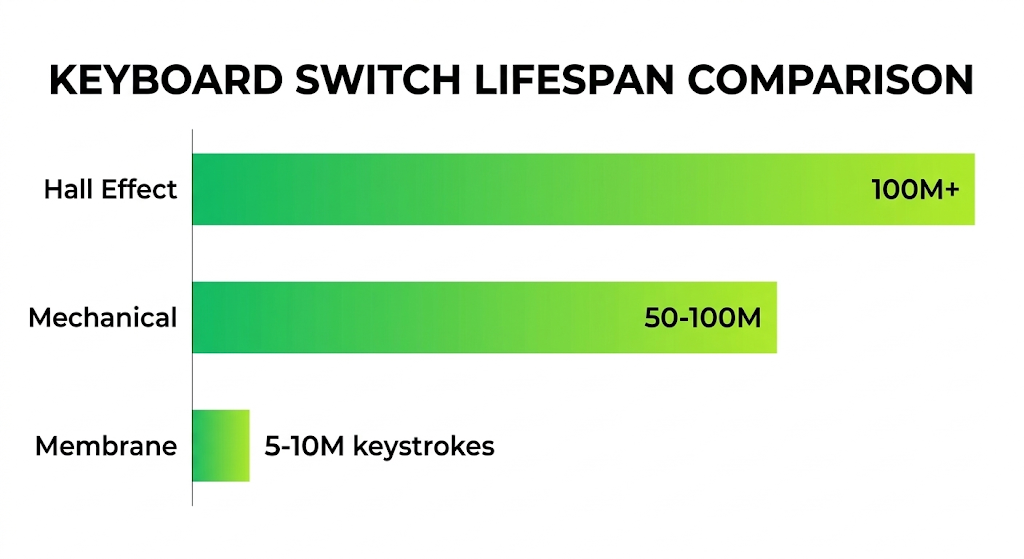
Mechanical switches are rated for 50–100 million keystrokes per key (compared to 5–10 million for membrane domes). The actuation force and travel distance remain consistent throughout the switch’s lifespan because the metal spring doesn’t degrade the way rubber does. A mechanical keyboard will feel the same in year five as it did on day one.
The Feel: What Your Fingers Actually Experience
Specs tell one story. Your fingers tell another. The tactile experience of typing and gaming on each keyboard type is fundamentally different, and personal preference plays a larger role here than any benchmark.
Membrane Feel
Membrane keyboards have a soft, cushioned keystroke with a single point of resistance — the rubber dome collapsing. There’s no tactile feedback telling you the keystroke has registered. You only know the key has actuated when it hits the bottom and you feel the hard stop of the plastic keycap hitting the keyboard plate.
This creates a “mushy” sensation that some users find comfortable for long typing sessions (the soft landing is gentle on your fingers) but frustrating for gaming (you can’t feel when the input registers, so you tend to bottom out every keystroke out of uncertainty).
Mechanical Feel
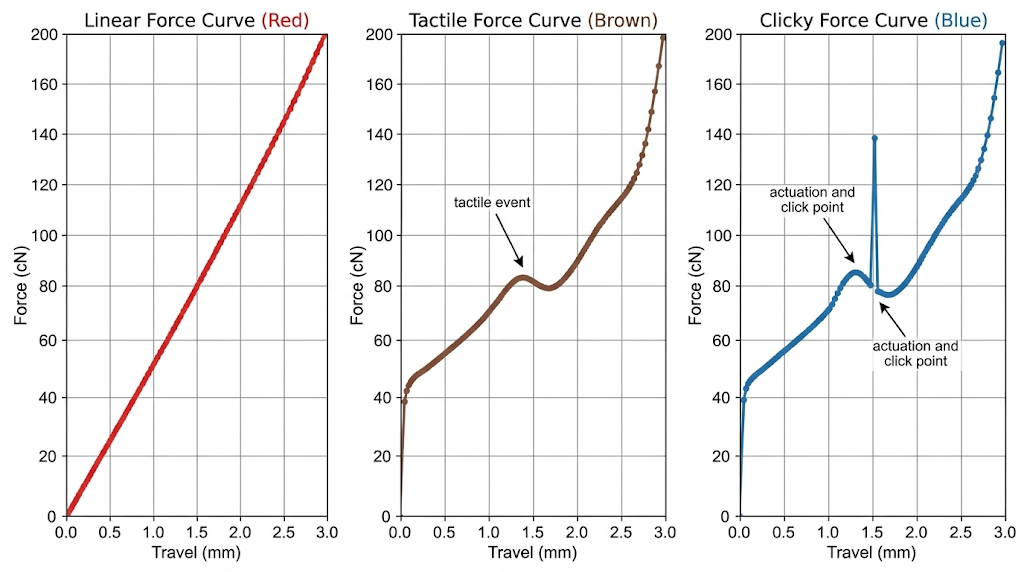
Mechanical keyboards come in three main switch profiles, each with a distinct feel:
Linear switches (e.g., Cherry MX Red, Gateron Yellow) have a smooth, consistent keystroke from top to bottom with no tactile bump or audible click. The actuation point is invisible to your fingers — you learn it through muscle memory. Linear switches are the most popular choice for gaming because the smooth travel allows for rapid, repeated keypresses with minimal finger fatigue.
Tactile switches (e.g., Cherry MX Brown, Gateron Brown) have a small bump you can feel at the actuation point. This bump tells your fingers that the keystroke has registered before you bottom out, which can improve typing accuracy and reduce the need to press keys all the way down. Many gamers who also type extensively prefer tactile switches for this dual-purpose feedback.
Clicky switches (e.g., Cherry MX Blue, Kailh Box White) have both a tactile bump and an audible click at the actuation point. They provide the most satisfying feedback for typing but are loud enough to annoy roommates, family members, and teammates on open voice chat. Most competitive gamers avoid clicky switches because the noise interferes with game audio and microphone quality.
Noise Levels: The Roommate Factor
This is the most practical consideration that spec sheets ignore.
Membrane keyboards are quiet. The rubber dome absorbs the impact of each keystroke, producing a soft, muffled sound that’s unlikely to disturb anyone in the same room. If you game late at night in a shared living space or stream with a sensitive microphone, membrane keyboards have a genuine noise advantage.
Mechanical keyboards range from moderate to loud depending on the switch type. Linear switches are the quietest mechanical option — they produce a soft “thock” on bottom-out that’s louder than membrane but not intrusive. Tactile switches are slightly louder due to the bump mechanism. Clicky switches are significantly louder and will be picked up by your microphone during voice chat.
Noise reduction options for mechanical keyboards: If you want mechanical performance without the noise, look for keyboards with sound-dampening foam inside the case, silicone switch dampeners (O-rings), and lubricated stabilizers. Many mid-range mechanical keyboards in 2026 include factory-applied sound dampening that brings the noise level close to membrane territory.
The Third Option: Hall Effect and Optical Switches
In 2026, the mechanical vs. membrane debate is being disrupted by two newer technologies that don’t fit neatly into either category.
Hall Effect Magnetic Switches
Hall effect switches use a magnet embedded in the key stem and a magnetic sensor on the PCB to detect keypresses. There are no physical metal contacts — the sensor measures the magnetic field strength to determine the key’s exact position at any point in its travel.
Why this matters for gaming: Hall effect switches enable rapid trigger functionality. Instead of a fixed actuation point, the keyboard detects the exact moment you begin pressing the key (actuation) and the exact moment you begin releasing it (deactivation). This means the key can re-actuate almost instantly after you release it, without needing to return to the top of the travel. In games that rely on rapid tapping or counter-strafing (Valorant, CS2, osu!), this provides a measurable input speed advantage that traditional mechanical switches cannot match.
Hall effect switches also allow you to adjust the actuation point via software — set it to 0.1mm for maximum speed in competitive games, or 2.0mm for typing accuracy. This flexibility makes them the most versatile switch technology available in 2026.
Optical Switches
Optical switches use a beam of infrared light instead of metal contacts to detect keypresses. When you press the key, the stem interrupts the light beam, and the keyboard registers the keystroke. Because there’s no physical contact to debounce, optical switches can achieve slightly faster signal processing than traditional mechanical switches.
Optical switches are most commonly found in Razer’s Huntsman line and offer a feel similar to linear mechanical switches with marginally lower latency. The practical difference in gaming is minimal — we’re talking fractions of a millisecond — but the technology eliminates the contact bounce delay that traditional mechanical switches require.
Durability and Longevity
Factor
Membrane
Mechanical
Hall Effect
Rated lifespan
5–10 million keystrokes
50–100 million keystrokes
100+ million keystrokes
Consistency over time
Degrades (rubber loses elasticity)
Consistent (metal spring)
Consistent (no physical contact)
Spill resistance
High (membrane seals the circuit)
Low (open switch housing)
Low (open switch housing)
Keycap replacement
Limited (proprietary stems on many models)
Universal (standard cross-stem)
Universal (standard cross-stem)
Switch replacement
Not possible (integrated membrane)
Possible on hot-swap boards
Possible on hot-swap boards
The practical takeaway: A membrane keyboard will typically last 2–4 years of daily gaming before the rubber domes begin to feel inconsistent. A mechanical or Hall effect keyboard will last 10+ years with no perceptible change in feel. The higher upfront cost of a mechanical keyboard is offset by its significantly longer usable lifespan.
Who Should Buy Which Type
Buy a Membrane Keyboard If:
You’re on the tightest possible budget. Membrane keyboards are the cheapest option available, and a functional membrane keyboard is better than no keyboard at all.
You game casually. If you play single-player RPGs, strategy games, or casual multiplayer where input speed isn’t a competitive factor, the performance difference won’t affect your experience.
You need a quiet keyboard. Shared living spaces, late-night gaming sessions, and streaming setups with sensitive microphones benefit from the membrane’s noise advantage.
You’re prone to spills. The sealed membrane design provides better liquid resistance than open mechanical switches. If you eat and drink at your desk regularly, a membrane keyboard is more forgiving of accidents.
Buy a Mechanical Keyboard If:
You play competitive multiplayer games. FPS, fighting games, MOBAs, and rhythm games all benefit from faster actuation, NKRO, and consistent keystroke registration.
You type extensively in addition to gaming. The tactile feedback and customizable switch options make mechanical keyboards significantly more comfortable and accurate for long typing sessions.
You want your keyboard to last. A mechanical keyboard will outlast multiple membrane keyboards, making it the better long-term investment despite the higher initial cost.
You want to customize your setup. Mechanical keyboards support hot-swappable switches, custom keycaps, programmable macros, and adjustable actuation points — none of which are available on membrane keyboards.
Buy a Hall Effect Keyboard If:
You play competitive FPS at a high level. Rapid trigger technology provides a genuine input advantage in games like Valorant, CS2, and Overwatch 2 where counter-strafing and peek timing are critical.
You want one keyboard for gaming and typing. The ability to adjust actuation points via software means you can switch between a 0.1mm actuation for gaming and a 2.0mm actuation for typing without changing hardware.
You’re future-proofing your setup. Hall effect technology is the direction the industry is moving, and keyboards with magnetic switches will receive software updates and new features over time that membrane and traditional mechanical keyboards cannot.
Common Myths Debunked
“Mechanical keyboards are always better for gaming.” Not always. If you play casual single-player games on a tight budget in a shared room, a membrane keyboard’s quiet operation and low cost may make it the better choice for your specific situation. The performance advantages of mechanical switches only matter in scenarios where input speed and precision affect outcomes.
“More expensive means better.” A $200 mechanical keyboard with premium switches won’t make you a better player than a $40 mechanical keyboard with basic linear switches. The performance gap between budget and premium mechanical keyboards is far smaller than the gap between membrane and mechanical. Spend enough to get a reliable mechanical switch; spend more only for build quality, features, and aesthetics you personally value.
“All mechanical switches feel the same.” The difference between a linear, tactile, and clicky switch is immediately noticeable to anyone who tries them side by side. Even within the linear category, switches from different manufacturers (Cherry, Gateron, Kailh, Outemu) have distinct spring weights, smoothness levels, and sound profiles. Try switches in person at a local electronics store before committing if possible.
“Membrane keyboards can’t have anti-ghosting.” Some higher-end membrane keyboards advertise “anti-ghosting” or “gaming-grade” rollover, and they do offer improved multi-key registration compared to basic office membrane keyboards. However, they still cannot match the full NKRO of a mechanical keyboard due to the fundamental limitations of the membrane circuit matrix.
Frequently Asked Questions
Is a mechanical keyboard worth it for gaming?
For competitive multiplayer gaming, yes. The faster actuation point, full N-key rollover, and consistent keystroke registration provide measurable input advantages over membrane keyboards. For casual single-player gaming, the difference is less significant, and a membrane keyboard may be sufficient. The best way to decide is to consider whether input speed and precision affect your game outcomes.
What is the best switch type for gaming?
Linear switches are the most popular choice for gaming due to their smooth, uninterrupted keystroke that allows for rapid repeated presses. Tactile switches are a good alternative if you also type extensively and want feedback at the actuation point. Clicky switches are generally not recommended for gaming due to their loud noise, which interferes with game audio and microphone clarity. Hall effect switches with rapid trigger are the current competitive standard for FPS esports in 2026.
Can I use a membrane keyboard for competitive gaming?
Yes, but you’ll be at a slight input disadvantage compared to players using mechanical or Hall effect keyboards. The full-travel actuation and limited key rollover of membrane keyboards mean your inputs register slightly later and may drop during complex key combinations. Many players have reached high ranks using membrane keyboards, so the hardware is not a hard ceiling — but it is a friction point that mechanical keyboards eliminate.
Are Hall effect keyboards better than traditional mechanical keyboards?
For competitive FPS gaming, Hall effect keyboards with rapid trigger offer a measurable advantage over traditional mechanical switches due to their adjustable actuation points and instant re-actuation capability. For general gaming and typing, the difference is less pronounced, and traditional mechanical switches remain excellent. Hall effect keyboards are the premium choice in 2026, but they’re not a necessity for most gamers.
How do I know if my current keyboard is membrane or mechanical?
Pull off a keycap (gently, using a keycap puller or your fingers). If you see a small plastic cross-shaped stem (+) sitting inside a square housing, it’s a mechanical switch. If you see a flat rubber dome or a rubber sheet with a small nub, it’s a membrane keyboard. If the keycap doesn’t come off easily or you see a scissor-like mechanism, it’s likely a low-profile membrane or laptop-style keyboard.
Do mechanical keyboards improve typing speed?
Indirectly, yes. The tactile feedback at the actuation point (on tactile and clicky switches) teaches your fingers to stop pressing once the keystroke registers, reducing unnecessary bottoming out and finger fatigue. This can improve typing accuracy and speed over time. Linear switches don’t provide tactile feedback but still benefit from the shorter actuation distance and consistent key feel. Most typists report a noticeable improvement within the first two weeks of switching from membrane to mechanical.
The Bottom Line
The choice between membrane and mechanical isn’t about which technology is objectively superior — it’s about which technology matches your gaming habits, your living situation, and your budget.
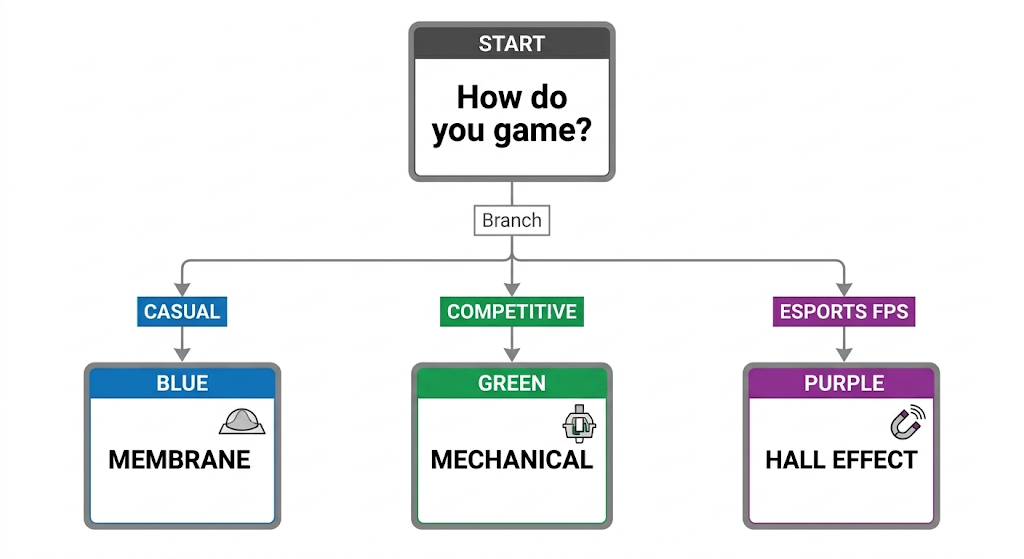
If you play competitively and want every input advantage available, invest in a mechanical keyboard with linear switches or a Hall effect keyboard with rapid trigger. If you game casually, need silence, or are working with a very tight budget, a membrane keyboard will serve you adequately.
The most important thing is that you understand the trade-offs so you can make a deliberate choice rather than defaulting to whatever came in the box with your PC.